Course A — Robot Delivery: Designing a System of Systems with CADL & SoS-DSL
Audience: Undergraduates and beginning graduate students who have just been introduced to System of Systems (SoS) thinking. No CADL experience required.
Duration: about 95 minutes — a 5-minute setup plus six 15-minute steps.
What you take home: A working CADL specification you wrote yourself, a generated Unity C# implementation, and a running 5-robot delivery simulation in which missed deadlines and battery-rule violations are detected and the affected contract instances are moved to
Violated.First time here? The recommended order is Why SoS-DSL? → Architecture & Code Walkthrough → this course. Reading the walkthrough before you start is recommended: it shows which part of the system each Step touches.
Why are we doing this?
A System of Systems (SoS) is a system whose parts are themselves independent, operationally autonomous systems — for example, a fleet of delivery robots, a central dispatcher, and the customers placing orders. The robot simulated in this hands-on is the Raspberry Pi Mouse ("raspimouse"), a small autonomous mobile robot — hence the simulator name cadl-raspimouse-simulator. (The physical robot runs on ROS; this hands-on is entirely simulator-based.) The parts have their own goals and their own software; the SoS designer's job is not to write all of their code, but to write the rules of the game they all follow: who can ask whom for what, what counts as a violation, what the consequences are.
Today you will learn three things:
- Describe the structure of an SoS in CADL — who exists, who talks to whom.
- Describe the rules of an SoS in the SoS-DSL extension (Appendix E) — what each contract instance must do, by when, with what consequences for violations.
- Generate executable code from a single specification, drop it into a Unity project, and watch the runtime detect violations of those rules in a running simulation.
What makes a system an SoS?
A useful litmus test before declaring something "an SoS" is Maier's five criteria ([Maier, 1998]; the SoS taxonomy itself is standardised in ISO/IEC/IEEE 21841:2019):
| # | Criterion | Plain-English check |
|---|---|---|
| 1 | Operational independence | Does each part work on its own when the SoS is "off"? |
| 2 | Managerial independence | Does each part have its own owner / decision-maker? |
| 3 | Geographic distribution | Are the parts spread out and exchanging information rather than energy or matter? |
| 4 | Emergent behaviour | Does the whole do things no individual part can? |
| 5 | Evolutionary development | Do parts get added, removed, modified over the SoS's lifetime? |
(1) and (2) are essentially mandatory. (3)–(5) usually accompany them.
Applying it — the robot delivery in this hands-on:
- ✓ (1) each robot can roam on its own even with no assignment.
- △ (2) all robots share a single dispatcher, so managerial independence is weak.
- ✓ (3) robots are distributed over a graph-shaped road network.
- ✓ (4) the collective delivery throughput is something no single robot can produce alone.
- △ (5) the robot count is fixed in this scenario, but the simulator itself supports changing it.
Because (2) is weak, this hands-on sits closer to a parallel control problem than to a textbook SoS. The CADL files nevertheless declare it type: Acknowledged: each robot is modelled as a constituent system that keeps its own control software and autonomy (autonomy: high) while recognising the dispatcher as the SoS-level authority for task assignment. A domain where managerial independence clearly holds (food delivery) is the recommended choice for Part 2 of the exercises booklet.
📚 For the full standards landscape (ISO/IEC/IEEE 21839 / 21840 / 21841 / 15288 / 42010), the four SoS taxonomy types, related research lines (ADLs, Normative MAS, Runtime Verification), and a curated reading list, see →
academic-background.md.
The big picture
You only need to write the leftmost box (a CADL file). Everything to its right is generated from it by the toolchain commands.
   ┌────────────────────────┐
   │  Your CADL source      │   ← You write this in Step 2 & 3
   │  my_delivery.cadl      │
   └──────────┬─────────────┘
              │
              │  cadl check    →  catch typos / type errors
              │  cadl sim-ir   →  emit a JSON Intermediate Representation (IR)
              │
              ▼
   ┌────────────────────────┐
   │  Sim-IR JSON           │
   │  (cadl-spec App. E.7)  │
   └─────┬──────────────┬───┘
         │              │
         │              └──────────────┐
         │  cadl-explorer              │  cadl codegen --target unity-csharp
         │  Lifecycle View             │
         ▼                             ▼
   ┌─────────────────┐       ┌─────────────────────────┐
   │  State machine  │       │  Unity C# tree          │
   │  diagram        │       │  Runtime/    Generated/ │
   └─────────────────┘       └────────────┬────────────┘
                                          │  drop into
                                          ▼
                             ┌──────────────────────────┐
                             │  Unity scene + arbitrator │
                             │  → live contract events   │
                             │  in the Console           │
                             └──────────────────────────┘
Prerequisites
| Tool | Version | Why |
|---|---|---|
| Python | 3.9+ | runs the cadl CLI |
| Unity | 6000.2.9f1 (Unity 6.2) | runs the simulation |
| Go | 1.23+ | builds the arbitrator |
| NATS Server | latest | message bus between robots ⇄ arbitrator |
| Node.js | 20+ | renders the spec website (optional) |
# macOS via Homebrew
brew install python@3.11 go nats-server node
# Unity is installed via Unity Hub.
Step 0 — Setup (5 min)
What you'll learn
- The repositories that make up the toolchain and which branch of each one to use.
Background
The CADL toolchain is split across four repositories so each piece can evolve independently:
| Repository | Role | Branch to use |
|---|---|---|
cadl-spec | the language reference and this hands-on site (Docusaurus) | main (default) |
cadl (cloned as cadl_repo) | the compiler: parser, IR, code generators | master (default) |
cadl-explorer | a Streamlit app that visualises and edits CADL | main (default) |
cadl-raspimouse-simulator | the simulator used in Steps 5–6: Unity project, Go arbitrator and Python reference runtime in one repository | main (default) |
cadl-spec (this specification and hands-on site), cadl (compiler / CLI), cadl-explorer (visualisation) and cadl-raspimouse-simulator (simulator) are public, so every step of Course A can be followed with public repositories. mobility-sos-exercise, used by Course B, is not publicly available at present.
Procedure
mkdir -p ~/program && cd ~/program

# 1) Clone the repositories.
#    cadl-spec, cadl and cadl-raspimouse-simulator stay on their default
#    branches (main / master / main).
git clone https://github.com/ertlnagoya/cadl-spec
git clone https://github.com/ertlnagoya/cadl                         cadl_repo
git clone https://github.com/ertlnagoya/cadl-explorer
git clone https://github.com/ertlnagoya/cadl-raspimouse-simulator

# 2) Install the cadl CLI in editable mode so changes are picked up.
cd ~/program/cadl_repo
python3 -m venv .venv && source .venv/bin/activate
python3 -m pip install --upgrade pip   # editable install needs pip 21.3 or later
pip install -e .
cd ~/program
Expected output
$ cadl --help
usage: cadl [-h] [--version]
            {parse,check,verify,codegen,regime-map,iec62853,sim-validate,sim-ir,sim-gen,ai}
            ...

CADL: Contract Architecture Description Language toolchain

positional arguments:
  {parse,check,verify,codegen,regime-map,iec62853,sim-validate,sim-ir,sim-gen,ai}
                        Available commands
    parse               Parse a CADL file and report errors
    check               Parse and type-check a CADL file
    verify              Parse, type-check, and verify a CADL file
    codegen             Generate runtime code from a CADL file
    ...
Check 0
If cadl codegen --help lists unity-csharp among the --target choices ({python,solidity,opa,unity-csharp}), your install is correct.
Recap
After setup you can see that CADL is really four cooperating repositories — the spec site, the compiler, the visualizer, and the simulator. Everything that follows assumes each repository is on the branch listed in the table above (main everywhere, and master for cadl_repo); most trouble at this stage comes from a wrong branch.
🛠 Setup troubleshooting
Check your branches (the most common pitfall). All four repositories are used on their default branches: main, and master for cadl_repo. If a page or a command described here is missing, first check that you have not switched to an older branch. Verify:
cd ~/program
echo "cadl-spec:     $(git -C cadl-spec branch --show-current)"       # main
echo "cadl_repo:     $(git -C cadl_repo branch --show-current)"       # master
echo "cadl-explorer: $(git -C cadl-explorer branch --show-current)"   # main
echo "simulator:     $(git -C cadl-raspimouse-simulator branch --show-current)"   # main
For any repository on the wrong branch, switch with git -C ~/program/<repo> checkout <branch>.
pip install -e . fails with File "setup.py" or "setup.cfg" not found. The pip in the venv is too old. On macOS, /usr/bin/python3 (Python 3.9 from the Command Line Tools) creates venvs with pip 21.2.4, which cannot do an editable install of a pyproject.toml-only project such as cadl. Upgrade pip inside the venv and install again:
cd ~/program/cadl_repo
source .venv/bin/activate
python3 -m pip install --upgrade pip
pip install -e .
cadl reports bad interpreter, or cadl --help shows an older command list. The shell found a different cadl than the one in cadl_repo/.venv. Check with which cadl; it should print ~/program/cadl_repo/.venv/bin/cadl. In a new terminal, run source ~/program/cadl_repo/.venv/bin/activate first. If the venv itself reports bad interpreter (the Python it was built with has been removed), delete .venv and repeat step 2.
Step 1 — Read the CADL spec (15 min)
What you'll learn
- Where in the spec the structure layer (actors / contracts / protocols) is described.
- Where in the spec the norms layer (Appendix E lifecycle / monitors) lives.
Background
A specification language has two jobs in an SoS context:
- Descriptive — what exists. The actors, the connections, the messages they exchange.
- Normative — what should happen. Which obligations, which deadlines, which violations.
CADL covers (1) directly in its main grammar (Appendix A). The SoS-DSL extension (Appendix E) adds (2) on top of (1) — same syntax family, just two new body keys: lifecycle: and monitors:.
Procedure
cd ~/program/cadl-spec
npm install
npm run start
# Browser opens at http://localhost:3000/cadl-spec/
Read these chapters in order; the time guide is what we recommend so you stay within the 15-minute budget.
| Chapter | What it answers | Time |
|---|---|---|
| 1. Introduction | What is CADL for? | 2 min |
| 5. Language Specification | How do I write actors / contracts / protocols? | 5 min |
| Appendix E (today's main) | How do I write a contract lifecycle and monitors? | 6 min |
| 7. Examples | What does a complete file look like? | 2 min |
Expected output
Section E.6 of Appendix E shows the robot-delivery example. The block below is an abridged version of it (one transition and one monitor only). Read it carefully — Step 3 will ask you to write something very similar.
contracts:
  - id: DELIVERY_SLA
    parties: [DISPATCHER, "ROBOT[*]", "CUSTOMER[*]"]
    assume:
      - "ROBOT[i].battery > 20"
    guarantee:
      - "delivery_time <= 300s"

    lifecycle:
      states: [Proposed, Assigned, Accepted, Delivering, Completed, Violated, Terminated]
      initial: Proposed
      terminal: [Completed, Violated, Terminated]
      transitions:
        - id: accept
          from: Assigned
          to:   Accepted
          on:   "ROBOT[i] -> DISPATCHER : ack(accepted)"
          deadline: 5s
          on_violation:
            transition: Violated
            severity:   Major

    monitors:
      - id: battery_guard
        observe: "ROBOT[i].battery"
        sampling: periodic(500ms)
        rule: "ROBOT[i].battery < 20 AND state == Assigned"
        on_match:
          transition: Violated
          severity:   Major
Check 1
Without scrolling, can you answer these three questions out loud?
- What is the initial state of a delivery contract? → Proposed
- If a robot does not ack within 5 seconds, what happens? → It is forced to transition to
Violatedwith severityMajor - Which monitor fires when battery drops below 20% while still Assigned? →
battery_guard
If you got all three, you understand the spec well enough to start writing.
Recap
Having read the spec, you can place its two layers — the structural layer (what exists) and the normative layer (what must hold) — and say where each one lives. For the delivery contract you now know the key rules: the initial state is Proposed, a missing ack within 5 s forces a Major jump to Violated, and a low battery while Assigned trips battery_guard. With that map in hand you are ready to start writing in Step 2.
Step 2 — Write CADL for Robot Delivery (15 min)
What you'll learn
- How to declare actors with
id,role,autonomy,interface. - How to declare a contract's parties, A/G clauses (
assume/guarantee), incentives.
Background
Think of a CADL actors: block as a UML class diagram for the SoS — each actor type has ports (interface.input / interface.output) and a degree of self-direction (autonomy: low | medium | high). The contracts: block is the agreement between named subsets of those actors.
Procedure
Create a new file my_delivery.cadl in the root of cadl_repo (that is, ~/program/cadl_repo/my_delivery.cadl; the bundled example it resembles is examples/sos_dsl_robot_delivery.cadl), and paste the skeleton below. The commands in Steps 2–4 are run from ~/program/cadl_repo. Read the comments — they explain what each block does.
# my_delivery.cadl ─── My first SoS specification
# (this file just describes structure; norms come in Step 3)

sos:
  name: "MyDelivery"
  type: Acknowledged           # central authority + autonomous agents
  version: "0.1.0"

  context:
    environment:
      grid_size:    30                         # abstract parameter (not the Unity road graph)
      num_robots:    3
      time_step_ms: 100

  # ── WHO exists in the SoS ─────────────────────────────────────
  actors:
    - id: DISPATCHER
      role: "central_coordinator"
      autonomy: low                            # follows policy, no roaming
      capabilities: [assign_tasks]
      interface:
        input:  [position_report, task_completion]
        output: [route_assignment]

    - id: "ROBOT[1..N]"                        # parametric: N copies
      role: "delivery_agent"
      autonomy: high
      capabilities: [follow_path, pick_up, deliver]
      interface:
        input:  [route_assignment]
        output: [position_report, task_completion]

    - id: "CUSTOMER[1..M]"
      role: "service_requester"
      autonomy: medium
      capabilities: [submit_order]
      interface:
        input:  [delivery_notification]
        output: [delivery_request]

  # ── The agreement between them ────────────────────────────────
  contracts:
    - id: DELIVERY_SLA
      parties: [DISPATCHER, "ROBOT[*]", "CUSTOMER[*]"]
      assume:
        - "ROBOT[i].battery > 20"              # input precondition
      guarantee:
        - "delivery_time <= 300s"              # output postcondition
      incentives:
        type: task_completion
        lambda: 0.5
        rules:
          - "reward(ROBOT[i], 10) when on_time_delivery"
Run the type-checker:
cd ~/program/cadl_repo
cadl check my_delivery.cadl
Expected output
$ cadl check my_delivery.cadl
Type check passed: my_delivery.cadl
Now lower it to IR JSON. The output is about 100 lines long; the listing below is abridged to the parts that matter here:
cadl sim-ir my_delivery.cadl --format json
{
  "name": "MyDelivery",
  "sos_type": "Acknowledged",
  "description": "",
  "environment": {
    "grid_size":    30,
    "num_robots":    3,
    "time_step_ms": 100
  },
  "institution": {
    "actors": [ ... ],
    "contracts": [
      {
        "id": "DELIVERY_SLA",
        "parties": ["DISPATCHER", "ROBOT[*]", "CUSTOMER[*]"],
        "assume":   ["ROBOT[i].battery > 20"],
        "guarantee":["delivery_time <= 300s"],
        ...
        "lifecycle": null,           ← we have NOT written it yet
        "monitors":  []
      }
    ]
  },
Check 2
Verify both:
-
cadl check my_delivery.cadlprintsType check passed: my_delivery.cadl(and no[ERROR]lines). -
The IR JSON has
"lifecycle": nulland"monitors": []. These two lines sit at the end of the contract (around line 86 of the output). To print just them:cadl sim-ir my_delivery.cadl --format json | grep -n -A1 '"lifecycle"'86: "lifecycle": null,87- "monitors": []
These two null / [] are the gap we will fill in Step 3 — they are why the structure-only specification cannot say "the robot must ack within 5 seconds".
Common mistakes
| Symptom | Cause |
|---|---|
YAML parse error: while parsing a flow sequence | You wrote a subscripted identifier without quoting, e.g. [ROBOT[i].battery, ...]. Quote it: ["ROBOT[i].battery", ...]. |
Parse error: Invalid SoS type: 'Centralized'. Must be one of: Directed, Acknowledged, Collaborative, Virtual | CADL accepts only these four values for type:. |
[ERROR]: Undefined actor 'CUSTMER' referenced in contract 'DELIVERY_SLA' parties | A name under parties: (or inside a predicate, e.g. CUSTMER[i].x) is not declared under actors:. Usually a typo. An actor declared as CUSTOMER[1..M] is referred to as "CUSTOMER[*]" (all) or CUSTOMER[i] (one). |
Recap
You now have a CADL file that describes the structure of your SoS. It compiles, it lowers to IR, and the IR confirms there is exactly one contract called DELIVERY_SLA. Next we add the norms that let a runtime check that contract.
Step 3 — Add SoS-DSL contracts (lifecycle + monitors) (15 min)
What you'll learn
- The seven lifecycle states a contract instance can occupy.
- How to write a
deadline+on_violationthat puts a time bound on a transition and says where the instance goes when the bound is missed. - How to write a periodic
monitorwith a predicate over the world snapshot.
Background
A class-level contract spec (Step 2) describes the agreement, but a real SoS has many concurrent instances of that agreement — one per delivery request. Each instance has its own state that progresses over time:
The same lifecycle is reused for every delivery request — only the data (which robot, which customer) differs.
Procedure
First declare, near the top of my_delivery.cadl, that the file uses the SoS-DSL extension. Appendix E asks for this declaration (SHOULD), and the bundled example has it:
sos:
  name: "MyDelivery"
  type: Acknowledged           # central authority + autonomous agents
  version: "0.1.0"
  extensions:                  # ← NEW: this file uses the SoS-DSL extension
    - sos-dsl: 0.1
Then append the two highlighted blocks below to the DELIVERY_SLA contract. Indentation matters (YAML).
  contracts:
    - id: DELIVERY_SLA
      parties: [DISPATCHER, "ROBOT[*]", "CUSTOMER[*]"]
      assume:
        - "ROBOT[i].battery > 20"
      guarantee:
        - "delivery_time <= 300s"
      incentives:
        type: task_completion
        lambda: 0.5
        rules:
          - "reward(ROBOT[i], 10) when on_time_delivery"

      # ╔═══════════════════════════════════════════════════════════════╗
      # ║  NEW BLOCK 1: per-instance lifecycle                          ║
      # ╚═══════════════════════════════════════════════════════════════╝
      lifecycle:
        states:
          - Proposed
          - Assigned
          - Accepted
          - Delivering
          - Completed
          - Violated
          - Terminated
        initial: Proposed
        terminal: [Completed, Violated, Terminated]
        transitions:
          - id: assign
            from: Proposed
            to:   Assigned
            on:   "DISPATCHER -> ROBOT[i] : route_assignment"

          - id: accept
            from: Assigned
            to:   Accepted
            on:   "ROBOT[i] -> DISPATCHER : ack(accepted)"
            deadline: 5s                           # ⏱  must happen within 5s
            on_violation:                          # otherwise → Violated
              transition: Violated
              severity:   Major

          - id: start_delivery
            from: Accepted
            to:   Delivering
            on:   "ROBOT[i].status == InTransit"

          - id: complete
            from: Delivering
            to:   Completed
            on:   "ROBOT[i].status == Delivered"

      # ╔═══════════════════════════════════════════════════════════════╗
      # ║  NEW BLOCK 2: declarative monitors                            ║
      # ╚═══════════════════════════════════════════════════════════════╝
      monitors:
        - id: battery_guard
          observe: "ROBOT[i].battery"
          sampling: periodic(500ms)
          rule: "ROBOT[i].battery < 20 AND state == Assigned"
          on_match:
            transition: Violated
            severity:   Major
Re-run the type-checker:
cadl check my_delivery.cadl
Expected output
$ cadl check my_delivery.cadl
Type check passed: my_delivery.cadl
Lower to IR and verify the new fields are populated:
cadl sim-ir my_delivery.cadl --format json \
  | python3 -c "
import json, sys
d = json.load(sys.stdin)
c = d['institution']['contracts'][0]
print(f'lifecycle.initial : {c[\"lifecycle\"][\"initial\"]}')
print(f'lifecycle.states  : {c[\"lifecycle\"][\"states\"]}')
print(f'monitors[0].id    : {c[\"monitors\"][0][\"id\"]}')
print(f'  rule            : {c[\"monitors\"][0][\"rule\"]}')
"
lifecycle.initial : Proposed
lifecycle.states  : ['Proposed', 'Assigned', 'Accepted', 'Delivering', 'Completed', 'Violated', 'Terminated']
monitors[0].id    : battery_guard
  rule            : ROBOT[i].battery < 20 AND state == Assigned
Check 3
- The diff between Step 2 and Step 3 is only the
extensions:declaration and the two new blocks. No actor changed. - The IR's
"lifecycle": nullis now a populated object;"monitors": []is now a 1-element list.
Common mistakes
| Symptom | Why |
|---|---|
cadl check passes, but the IR has "lifecycle": null and Step 4 shows no states | The lifecycle: block has wrong indentation, so it is not read as part of the contract. lifecycle: must sit at the same level as assume: / guarantee:, with states: one level below it. The checker does not report this. |
Parser silently treats on: as a boolean | YAML 1.1 quirk; the example file works because the parser has a workaround (_yaml_on_key). If you're writing your own parser, watch for this. |
monitor.rule "always false" | The right-hand side of state == Assigned is a bare identifier by CADL convention. Quoting "Assigned" changes the meaning. |
Recap
The same file now describes both the structure (Step 2) and the rules (Step 3). The IR is no longer "structural-only" — it carries enough information to build a runtime.
Step 4 — Visualise the lifecycle (15 min)
What you'll learn
- How to read the Contract Lifecycle page of cadl-explorer (this course calls what it shows the Lifecycle View).
- How visual conventions (double circle, dashed border, red edge) map to the spec.
Procedure
Install into the virtual environment you activated in Step 0 (cadl_repo/.venv); requirements.txt asks for the same cadl-lang package that Step 0 installed from the clone, so nothing is replaced.
cd ~/program/cadl-explorer
pip install -r requirements.txt
streamlit run app.py
# Browser opens at http://localhost:8501
In the list of pages at the top of the sidebar, switch from the default page (Explorer) to Contract Lifecycle. (Before v0.4.0 the page was called SoS DSL Lifecycle. If the sidebar has neither, your checkout of cadl-explorer is out of date; run git pull on main.)
Two ways to load IR JSON:
- (a) Upload the IR of your own file. Save it first with
cadl sim-ir my_delivery.cadl --format json > my_delivery.ir.json(run in~/program/cadl_repo), then drag-and-dropmy_delivery.ir.jsoninto the file uploader. - (b) Use the bundled example
sos_dsl_robot_delivery.ir.json. It is shown as soon as the page opens; the dropdown (Bundled example) is there to return to it after an upload has been removed.
Shortcut. The Designer page draws the same diagram straight from a
.cadlfile, without thecadl sim-irstep: open the file under Open an existing CADL file and switch the view to Lifecycle. It can also step through one contract instance. This step uses the IR on purpose, because the IR is what the simulator and the generated runtime read.
What you should see
The screenshot below shows the page with (b), the bundled example: the sidebar with the uploader and the example selector on the left, the lifecycle diagram in the middle, and the lifecycle metadata on the right.
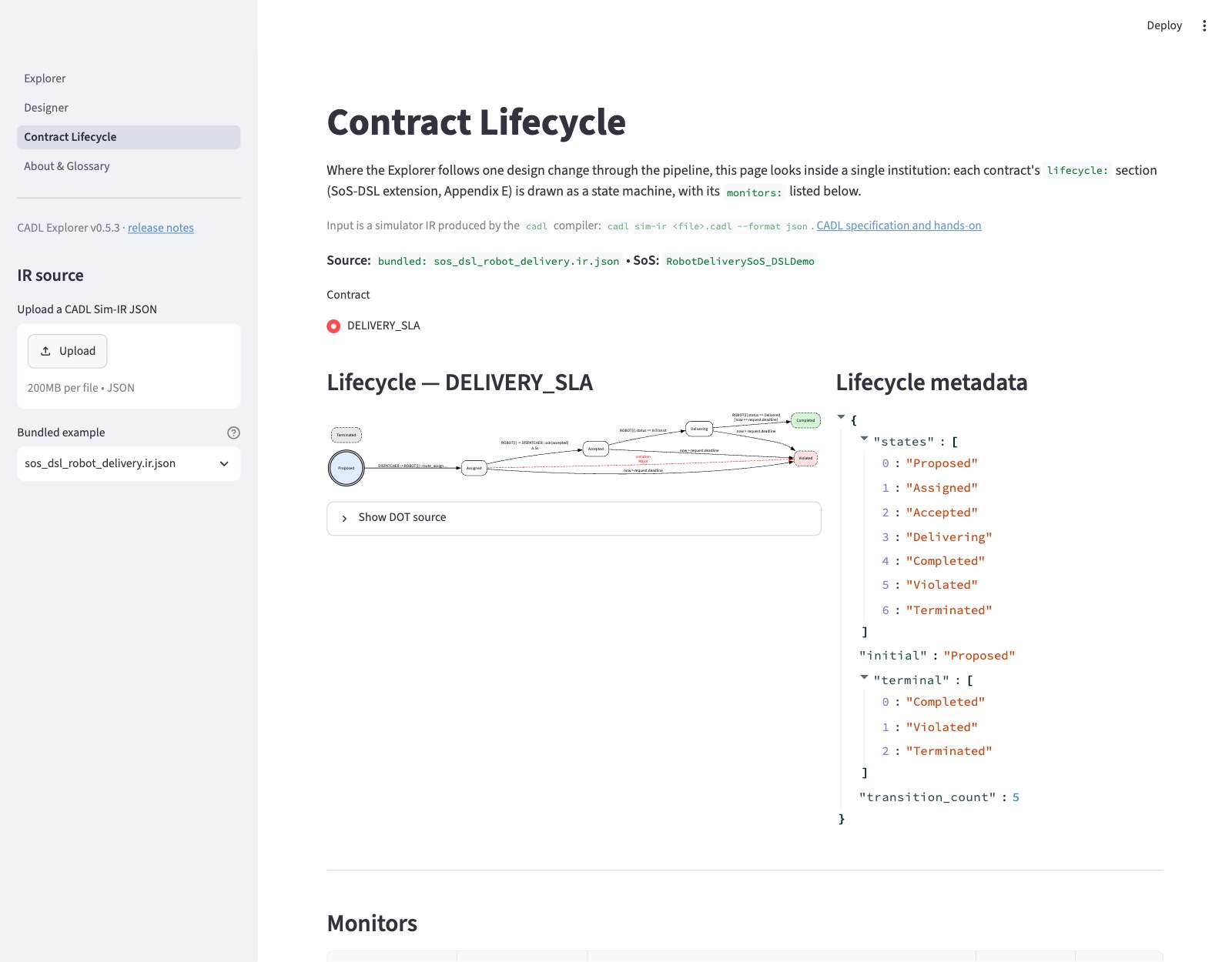
The diagram itself, enlarged (bundled example: 5 transitions; the red dashed edge is the forced move to Violated when the accept deadline expires):

Below the diagram, the page lists the monitors of the contract:
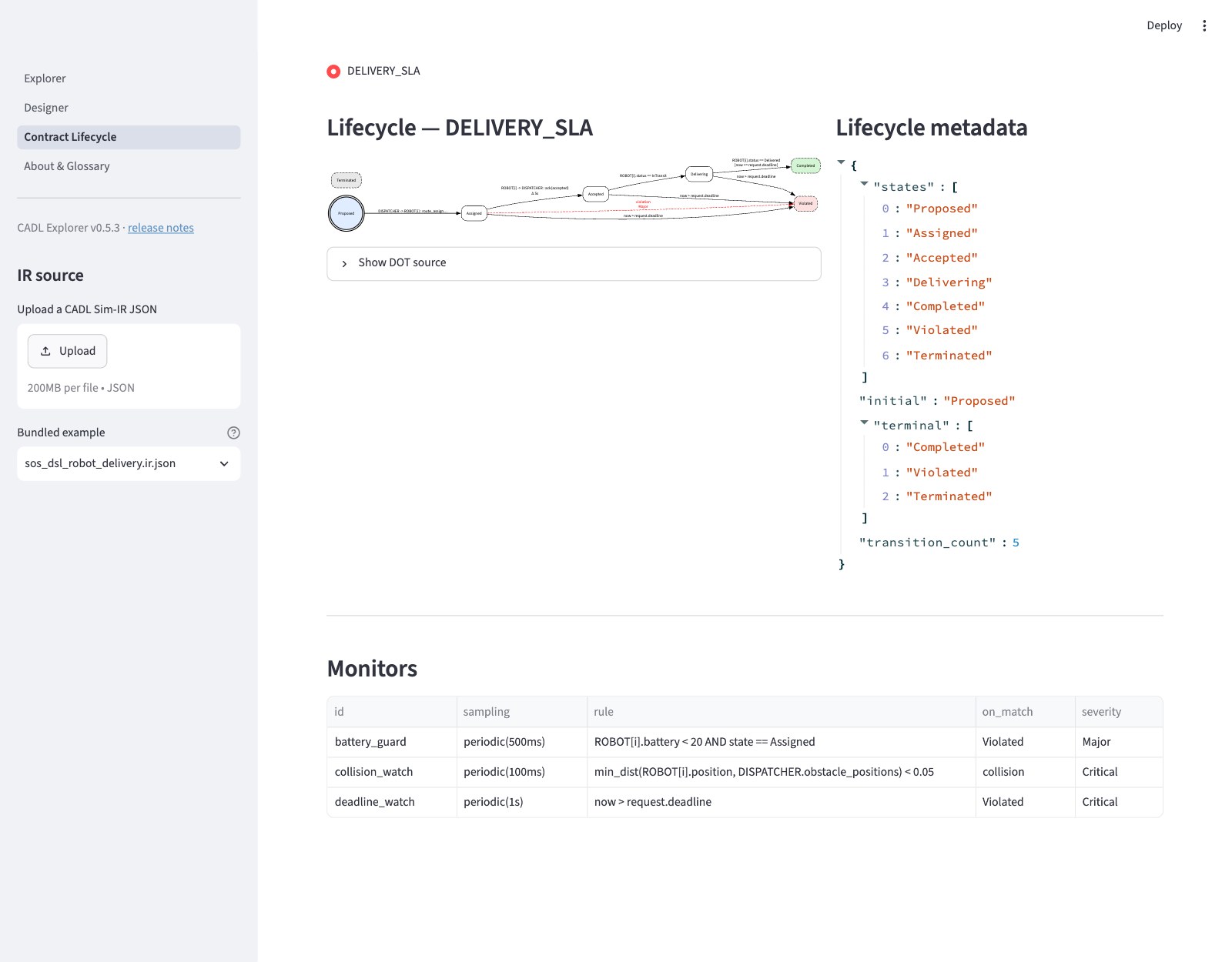
The sketch below reflects (a), my_delivery.cadl (4 transitions, 1 monitor). If you instead load (b), the bundled example sos_dsl_robot_delivery.cadl, you'll see 5 transitions (it adds late_failure) and 3 monitors (battery_guard / collision_watch / deadline_watch).
The page is split into two columns. The sketch is schematic: on the real page the diagram runs left to right, each edge is labelled with its trigger (the on: text, such as ROBOT[i] -> DISPATCHER : ack(accepted), then Δ 5s and any [when] condition) rather than the transition id, the metadata lists the state names, and the Monitors table also has a rule column.
┌──────────────────────────────────┬──────────────────────────────┐
│ Lifecycle — DELIVERY_SLA          │  Lifecycle metadata          │
│                                   │                               │
│   ┏━━━━━━━━━━┓                    │  states          : 7         │
│   ┃ Proposed ┃ ←initial(double)   │  initial         : Proposed  │
│   ┗━━━━┳━━━━━┛                    │  terminal        : 3         │
│        │ assign                   │  transition_count: 4         │
│        ▼                          │                               │
│   ┌──Assigned──┐                  │                               │
│   │            │ accept Δ 5s      │                               │
│   │            ▼                  │                               │
│   │       ┌Accepted┐              │                               │
│   │       └────┬───┘              │                               │
│   │ violation  │                  │                               │
│   │  (red dash)│ start_delivery   │                               │
│   ▼            ▼                  │                               │
│ ╔Violated╗ ┌Delivering┐           │                               │
│ ╚════════╝ └────┬─────┘           │                               │
│ (red, dashed)   │ complete         │                               │
│                 ▼                  │                               │
│             ╔Completed╗            │                               │
│             ╚═════════╝            │                               │
│             (green, dashed)        │                               │
└──────────────────────────────────┴──────────────────────────────┘

┌─────────────────────────────────────────────────────────────────┐
│ Monitors                                                          │
├──────────────┬──────────────────────┬─────────────┬──────────────┤
│ id           │ sampling             │ on_match    │ severity     │
├──────────────┼──────────────────────┼─────────────┼──────────────┤
│ battery_guard│ periodic(500ms)      │ Violated    │ Major        │
└──────────────┴──────────────────────┴─────────────┴──────────────┘
Visual conventions:
| Element | Meaning |
|---|---|
| Double circle | lifecycle.initial |
| Dashed box, green fill | terminal state Completed |
| Dashed box, red fill | terminal state Violated |
| Dashed box, grey fill | terminal state Terminated |
Solid edge, label Δ 5s | transition with deadline_ms = 5000 |
Red dashed edge with label violation Major | the forced move to the on_violation target state |
Check 4
Take a screenshot of your lifecycle (or just look carefully) and confirm:
- The only double-circle node is
Proposed. - There is exactly one red dashed edge going from
AssignedtoViolated. That is the forced move toViolatedwhen theacceptdeadline expires. (The bundled example also draws three solidnow > request.deadlineedges intoViolated, one for each state thelate_failuretransition can leave.) - The monitors table shows
battery_guardwith samplingperiodic(500ms)and severityMajor.
Recap
The diagram is generated directly from the IR JSON with zero hand-coding. If you change deadline: 5s to deadline: 10s in your CADL file, regenerate the IR, refresh the page — the edge label will read Δ 10s.
Step 5 — Generate Unity C# (15 min)
What you'll learn
- How a single CLI command turns your CADL into a Unity-ready C# tree.
- Why there are two runtimes with the same semantics: a Python reference runtime that interprets the IR, and the generated C#.
Procedure
The repo provides a single end-to-end script. Run it:
cd ~/program/cadl_repo
./scripts/sos_dsl_handson_e2e.sh \
    examples/sos_dsl_robot_delivery.cadl \
    --unity ../cadl-raspimouse-simulator/unity
Without the simulator repository you can still run the pipeline up to code generation: pass
--unity ""and the script stops after generating the C# tree underoutput/sos_dsl_handson/.Replace the input with
my_delivery.cadlif you want to use your own specification — note that your file will need alifecycle.transitions[*].on:matching the bridge's event names, so for the very first run we recommend the bundled example.
Expected output
$ ./scripts/sos_dsl_handson_e2e.sh examples/sos_dsl_robot_delivery.cadl \
      --unity ../cadl-raspimouse-simulator/unity

== INPUT ==
  source : .../examples/sos_dsl_robot_delivery.cadl
  size   : 153 lines

== Step 1/4 — parse + type-check (cadl check) ==
  OK

== Step 2/4 — emit Sim-IR JSON (cadl sim-ir) ==
  output/sos_dsl_handson/sos_dsl_robot_delivery.ir.json
  contracts : 1
  states    : 7
  monitors  : 3

== Step 3/4 — codegen Unity C# (cadl codegen --target unity-csharp) ==
  output    : output/sos_dsl_handson/unity-csharp
  runtime   : 5 files
  generated : 3 files
  total lines : 770

== Step 4/4 — drop into ../cadl-raspimouse-simulator/unity/Assets/Scripts/SoSDsl/ ==
  installed: .../Runtime, .../Generated
  preserved: .../Demo (if it existed)

== DONE ==
Next steps for the student:
  1. Open the Unity project at .../unity in Unity 6 (6000.2)
  2. Open Assets/Scenes/C-SoS.unity
  3. Add a ContractRuntimeHost GameObject (Demo/ContractRuntimeHost)
  4. Attach PilotContractBridge to each robot that has Pilot_CSoS
  5. Press Play and watch the Console for [lifecycle ...] / [violation ...]

See the hands-on textbook for the full walkthrough:
  https://www.ertl.jp/cadl-spec/docs/handson/main-textbook
Look at the generated tree:
output/sos_dsl_handson/unity-csharp/
├── Runtime/                          # constant per generation, common to all contracts
│   ├── Severity.cs                   # enum Minor / Major / Critical
│   ├── ContractEvent.cs              # struct used for both lifecycle & violation events
│   ├── EventBus.cs                   # tiny FIFO publish-subscribe
│   ├── PredicateEvaluator.cs         # CADL expression evaluator (mirrors the Python one)
│   └── ContractRuntime.cs            # registry + tick loop
└── Generated/                        # one set of files per CADL contract
    ├── DeliverySlaState.cs           # public enum DeliverySlaState { Proposed, Assigned, ... }
    ├── DeliverySlaContract.cs        # IContractInstance impl for DELIVERY_SLA
    └── DeliverySlaMonitors.cs        # one Eval_xxx method per monitor
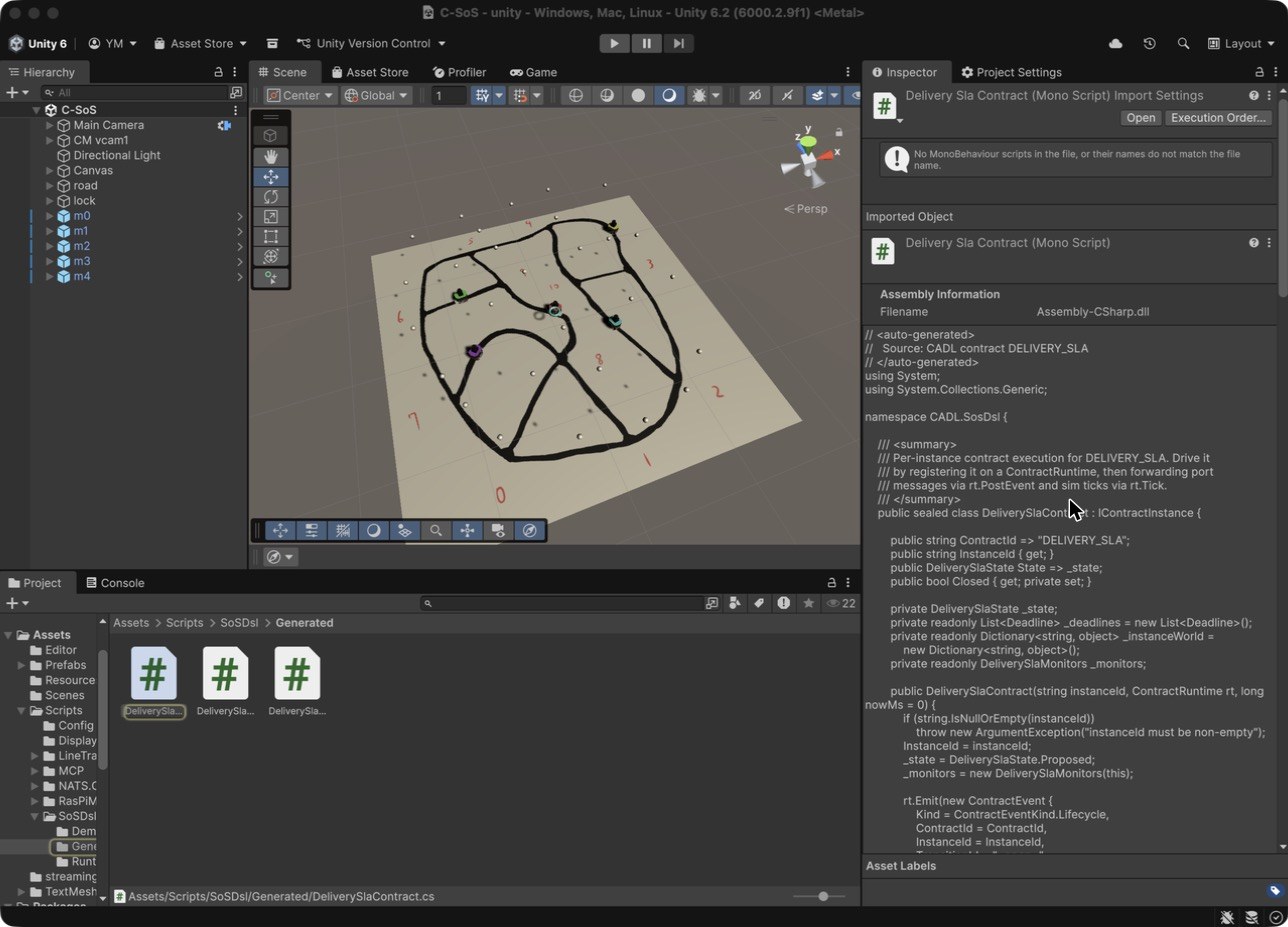
After the script has run, the generated files are in the Unity project. Open the project in Unity (Step 6.2 describes how) and look at the Project window: they appear under Assets/Scripts/SoSDsl/Generated. Selecting DeliverySlaContract shows the generated C# in the Inspector (you do not edit this file; it is overwritten every time you regenerate):
Why two runtimes?
The same IR drives both, in different ways. The Python reference runtime (cadl/runtime/engine.py in the simulator repository) is a hand-written interpreter that loads the IR JSON when it starts; the C# contract classes are generated from the IR by cadl codegen:
                             ┌──────────────────────┐
                             │ multi_robot_demo.py  │ ← run today as Python
                             │ (Python runtime)     │
                             │                      │
                  ┌──────────┘                      │
   IR JSON ──────►│                                 │
                  └──────────┐                      │
                             │ DeliverySlaContract  │ ← run later in Unity
                             │ (Unity / C#)         │
                             └──────────────────────┘
If both runtimes are correct, they must produce the same trace for the same inputs. We can sanity-check this without Unity:
cd ~/program/cadl-raspimouse-simulator
python3 -m cadl.runtime.multi_robot_demo --summary
$ python3 -m cadl.runtime.multi_robot_demo --summary
# multi_robot_demo summary (20 events)
  robot-0-1     state=Completed     violations=[(none)]
  robot-1-1     state=Violated      violations=[deadline:accept]
  robot-2-1     state=Violated      violations=[monitor:battery_guard]
  robot-3-1     state=Violated      violations=[monitor:deadline_watch]
  robot-4-1     state=Proposed      violations=[(none)]
Five robots, five different outcomes. This is a scripted Python scenario, built so that every outcome a contract can reach (normal completion, deadline violation, monitor violation, still unassigned) is visible in a single run.
The Unity run in Step 6 assigns deliveries at different times and gives the robots different battery settings, so these five rows will not be reproduced as-is (in Unity, typically the one robot whose battery you lowered violates via battery_guard while the rest progress to Completed). What you should be matching is not the per-robot outcomes but the mechanism — that the same lifecycle transitions, deadline, and monitor behave with the same meaning.
🛠 Troubleshooting:
multi_robot_demonot foundRun the command from the root of
cadl-raspimouse-simulator. Python findscadl.runtimerelative to the current directory; from anywhere else it finds only thecadlcompiler package, which has noruntimemodule, and reportsNo module named cadl.runtime.To look at one contract instance at a time,
demo_deliveryexercises the same three mechanisms (happy path, deadline violation, monitor violation) on one contract instance (its output is for a single contract, so its shape differs from the 5-robot table above):
Check 5
cd ~/program/cadl_repo
pip install pytest          # once; Step 0 does not install it
PYTHONPATH=src python3 -m pytest tests/test_unity_csharp_structural.py -q
# 9 passed
These nine tests catch the structural bugs that would prevent Unity from compiling the generated C# (mismatched braces, missing namespaces, name collisions, etc.). If they fail, the codegen has a regression.
Recap
You now have:
- A 245-line Sim-IR JSON (for the bundled example).
- A 770-line Unity-ready C# tree, dropped into the Unity project.
- A Python proof-of-concept showing what the C# trace must look like once it runs.
Step 6 — Run the simulation in Unity (15 min)
What you'll learn
- How to wire
ContractRuntimeHostandPilotContractBridgeinto an existing scene. - How to read live contract events in the Unity Console.
6.1 Start NATS and the arbitrator
In two separate terminals:
# Terminal 1 — NATS message broker
nats-server -p 4222
[INFO] Starting nats-server
[INFO] Server is ready
[INFO] Listening for client connections on 0.0.0.0:4222
# Terminal 2 — C-SoS arbitrator (Go)
cd ~/program/cadl-raspimouse-simulator/arbitrator/C-SoS/main
go run .
[Config] Loaded from ../../../unity/Assets/streamingAssets/cadl_config.json: nats_url=nats://localhost:4222 numAgents=5
[Config]   init=init next=next ret=ret fin=fin disp=disp resource=resource
[Config]   taskArbitration.enabled=true protocol=fcfs intervalSec=5.0
If that third line reads taskArbitration.enabled=true, the arbitrator has loaded its configuration and is ready to start handing out deliveries. If it says false, or the [Config] lines do not appear at all, the config file was not read — pass its absolute path with -config as shown in the note below. A further line, [Motivation] Disabled (baseline behavior), follows; it only says that the motivation extension is off.
🛠 Restart the arbitrator before every Play (important)
The Go arbitrator initializes robot count and delivery state once at startup and does not reset when you stop and re-enter Play in Unity. It keeps the previous session's "busy / assigned" state and stops broadcasting new deliveries, so all robots stay
Proposedand getViolatedbydeadline_watchafter ~5 minutes. Restart the Terminal-2 arbitrator (Ctrl+C, then re-run) before every Play (restart NATS too if unsure). Start order is always NATS → arbitrator → Unity Play.Pass the config as an absolute path to be safe (the default is relative and depends on the launch directory):
If
[Config] … taskArbitration.enabled=true …prints at startup, the config loaded correctly.
6.2 Open the C-SoS scene
- Launch Unity Hub. Open
~/program/cadl-raspimouse-simulator/unitywith Unity 6000.2.9f1 (Unity 6.2). - First open takes several minutes (package download and Library import).
- In the Project pane, double-click
Assets/Scenes/C-SoS.unity.
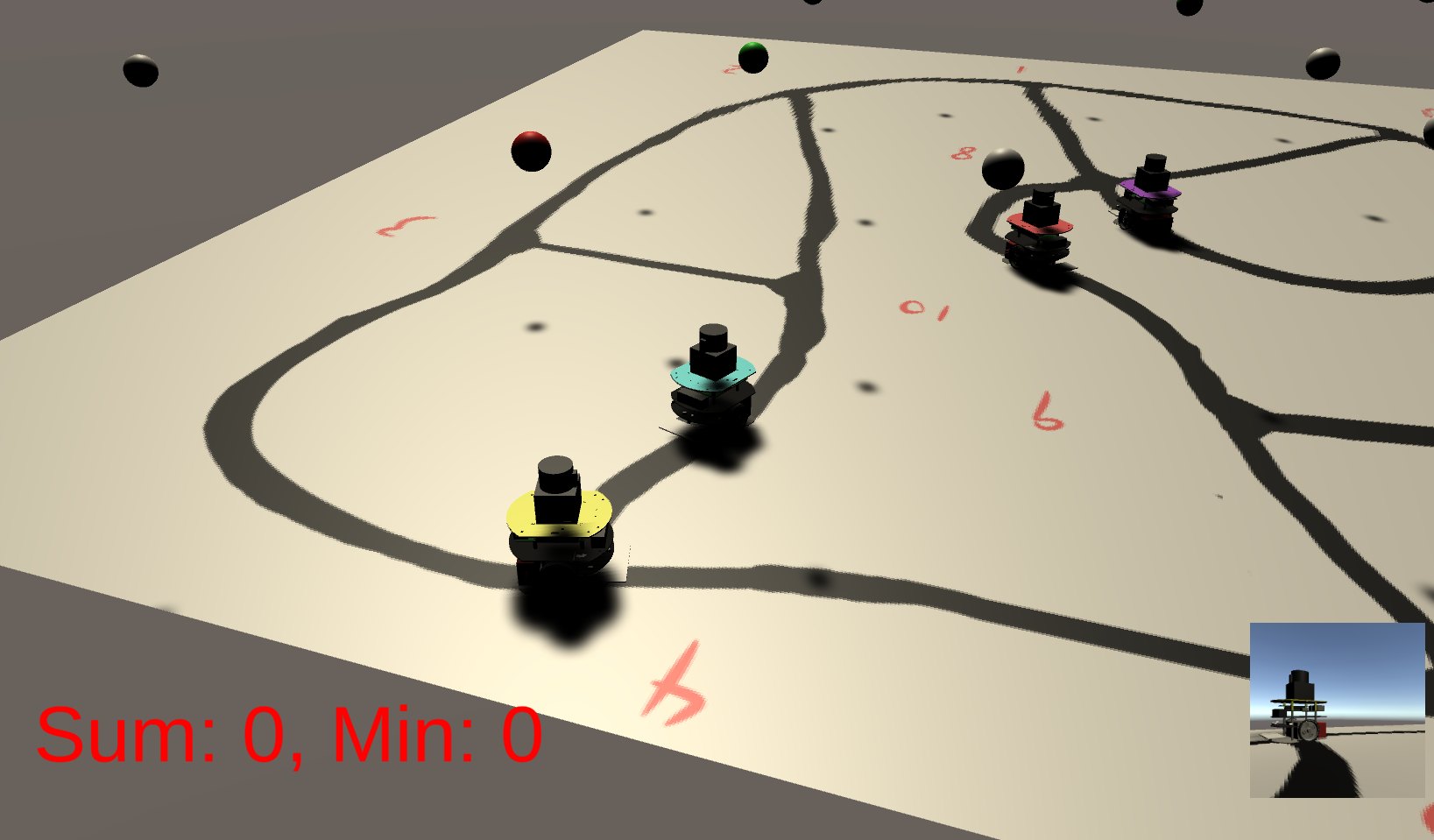
You should see a road network (graph) made of 11 nodes and 17 edges, with five robots — Red / Blue / Green / Yellow / Purple — driving on it. The node count, edge count, and robot count are all loaded from Assets/streamingAssets/cadl_config.json, so the Console also prints [GraphDefinition] Loaded from CADL config: 11 nodes, 17 edges. (The grid_size: 30 under context.environment in the CADL file is an abstract environment parameter that is carried into the IR; the Unity scene does not read it — its road graph is the one defined in cadl_config.json.)
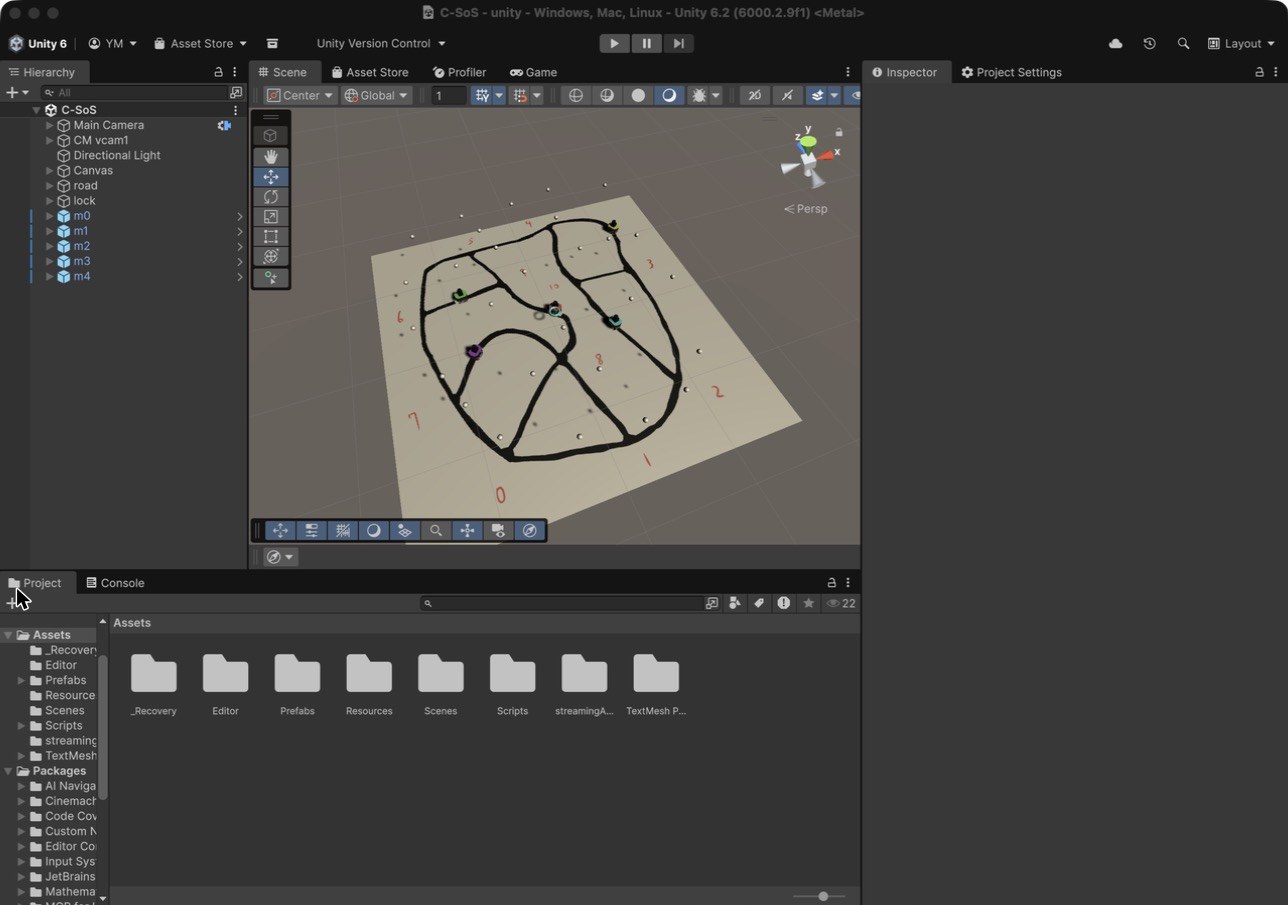
If the road looks small in the Scene view, select road in the Hierarchy, move the mouse over the Scene view and press F to frame it. During Play, the Game view follows one robot (m1) and shows the road around it, with that robot's own camera in the lower-right corner; the Scene view is where you can look at the whole road at once.
🛠 Mind the Unity version
The project is saved with Unity 6000.2.9f1 (recorded in
ProjectSettings/ProjectVersion.txt), and this course is checked with that version. Install it from Unity Hub; when you add the project, Unity Hub offers to install the matching Editor if it is missing.Do not open the project with Unity 2022.3 or older:
Packages/manifest.jsonlists packages that exist only in Unity 6. A newer Unity 6 release will ask to upgrade the project on first open; that has not been checked for this course.
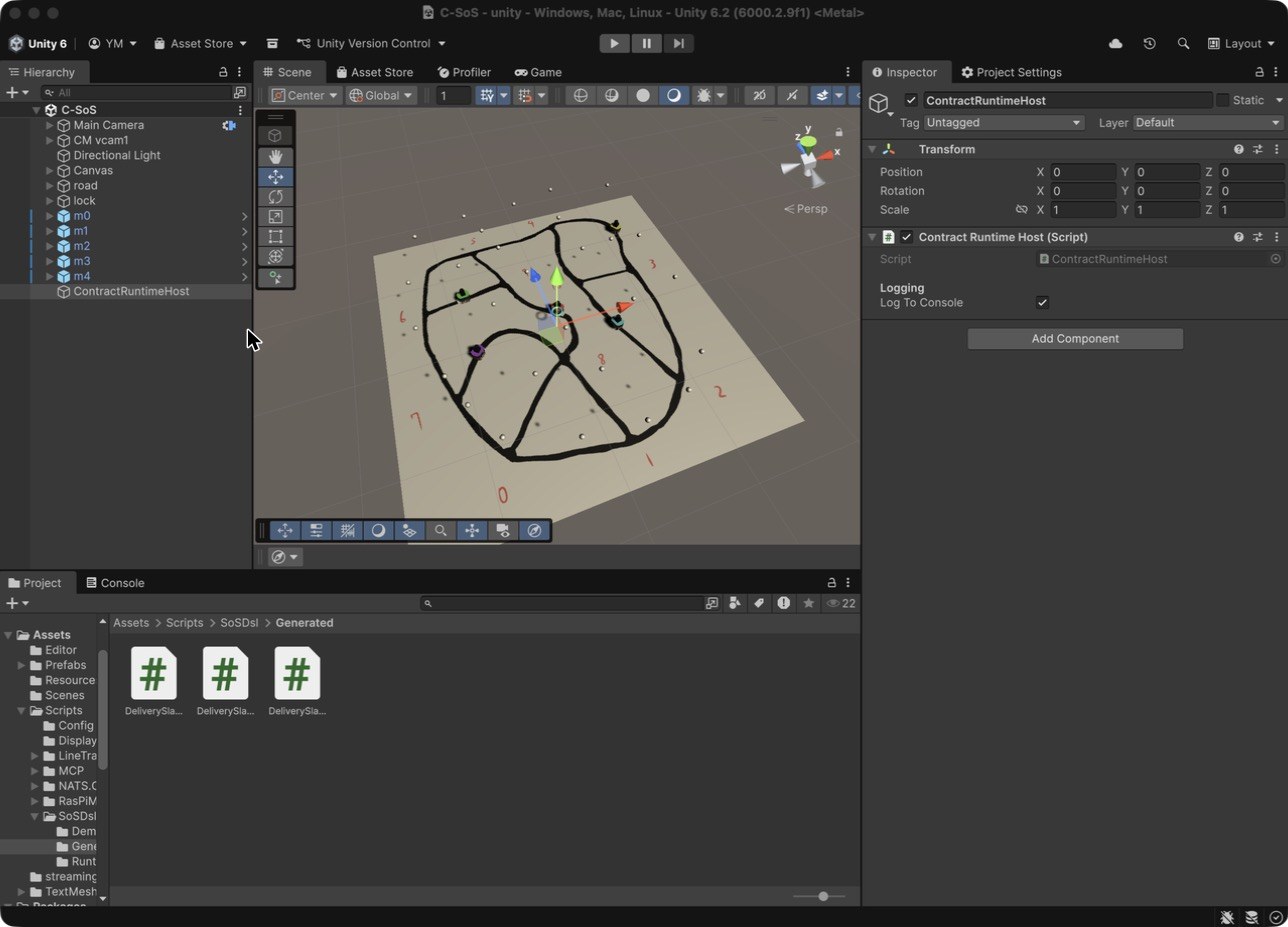
6.3 Add ContractRuntimeHost (one per scene)
Hierarchy ▸ Right-click ▸ Create Empty
Rename it to:        ContractRuntimeHost
Inspector ▸ Add Component ▸ search "ContractRuntimeHost" ▸ select  CADL.SosDsl.Demo.ContractRuntimeHost
Inspector:
Contract Runtime Host (Script)
└── Logging
    └── Log To Console   ☑  (leave checked)
6.4 Add PilotContractBridge to every robot
In the Hierarchy search box type Pilot_CSoS. Five robots will be filtered.
For each one:
Inspector ▸ Add Component ▸ "PilotContractBridge" (CADL.SosDsl.Demo.PilotContractBridge)
The Inspector now shows:
Pilot Contract Bridge (Script)
└── World keys (must match the contract's predicates)
    ├── Robot Battery       [───────●───] 90
    ├── Request Deadline Ms              300000
    └── Assigned Dwell Ms                700
Assigned Dwell Msis the minimum time the contract dwells inAssignedbefore accepting. It gives periodic monitors gated on that state (e.g.battery_guard, sampled every 500 ms) at least one evaluation window. Leave it at the default 700 ms — setting it below the monitor period would make violations undetectable.
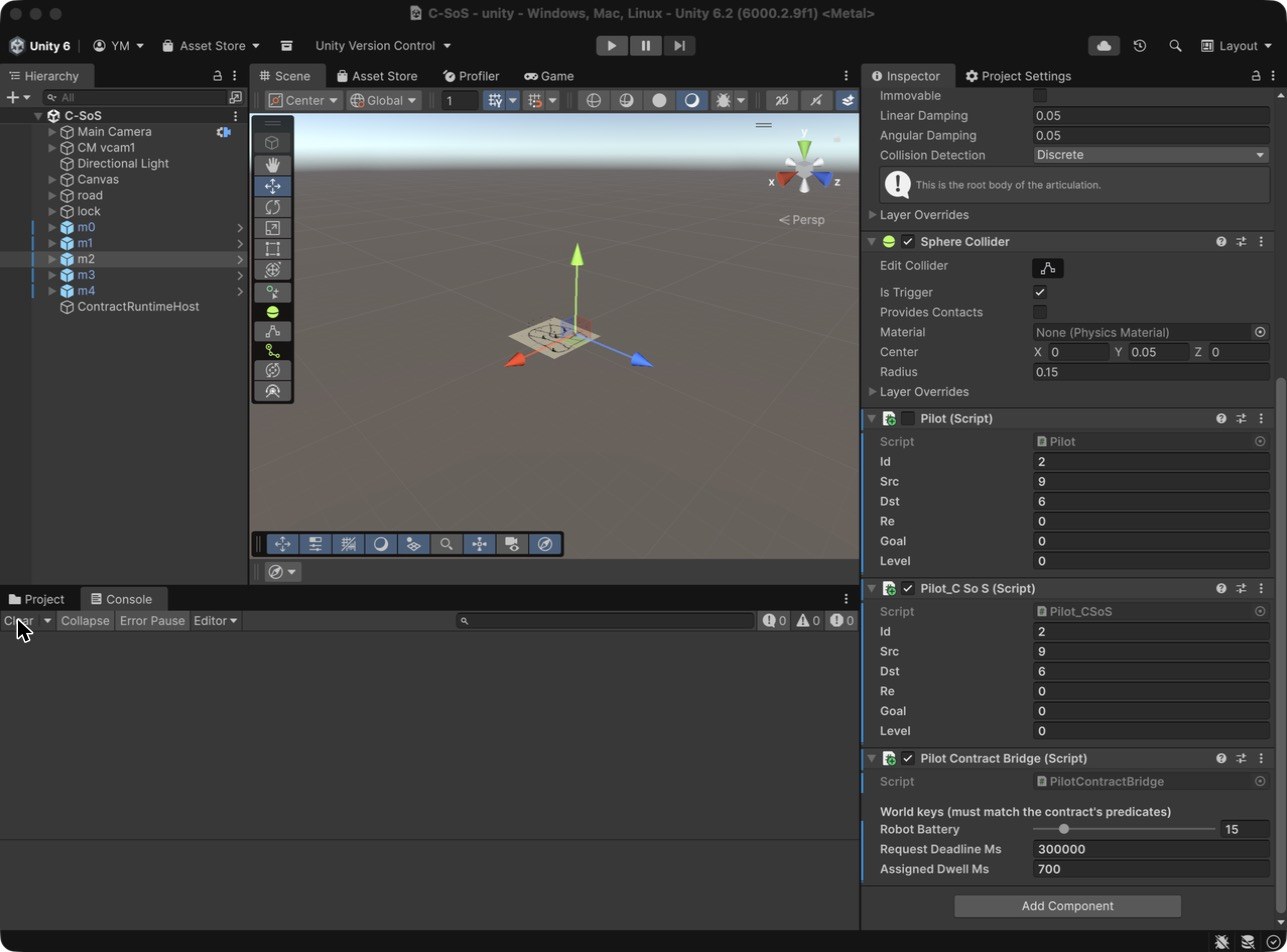
For one of the five robots, drag the Battery slider down to 15 so the battery_guard monitor will fire on that robot.
The Editor then looks like this, with the robot m2 selected and its Pilot Contract Bridge component at the bottom of the Inspector (Robot Battery 15):
Save the scene (Cmd+S / Ctrl+S).
6.5 Press Play
Click ▶ at the top of the Editor.
What you should see
In the Console, lines like the following should appear continuously. You can filter them by typing lifecycle DELIVERY_SLA or violation in the Console search box.
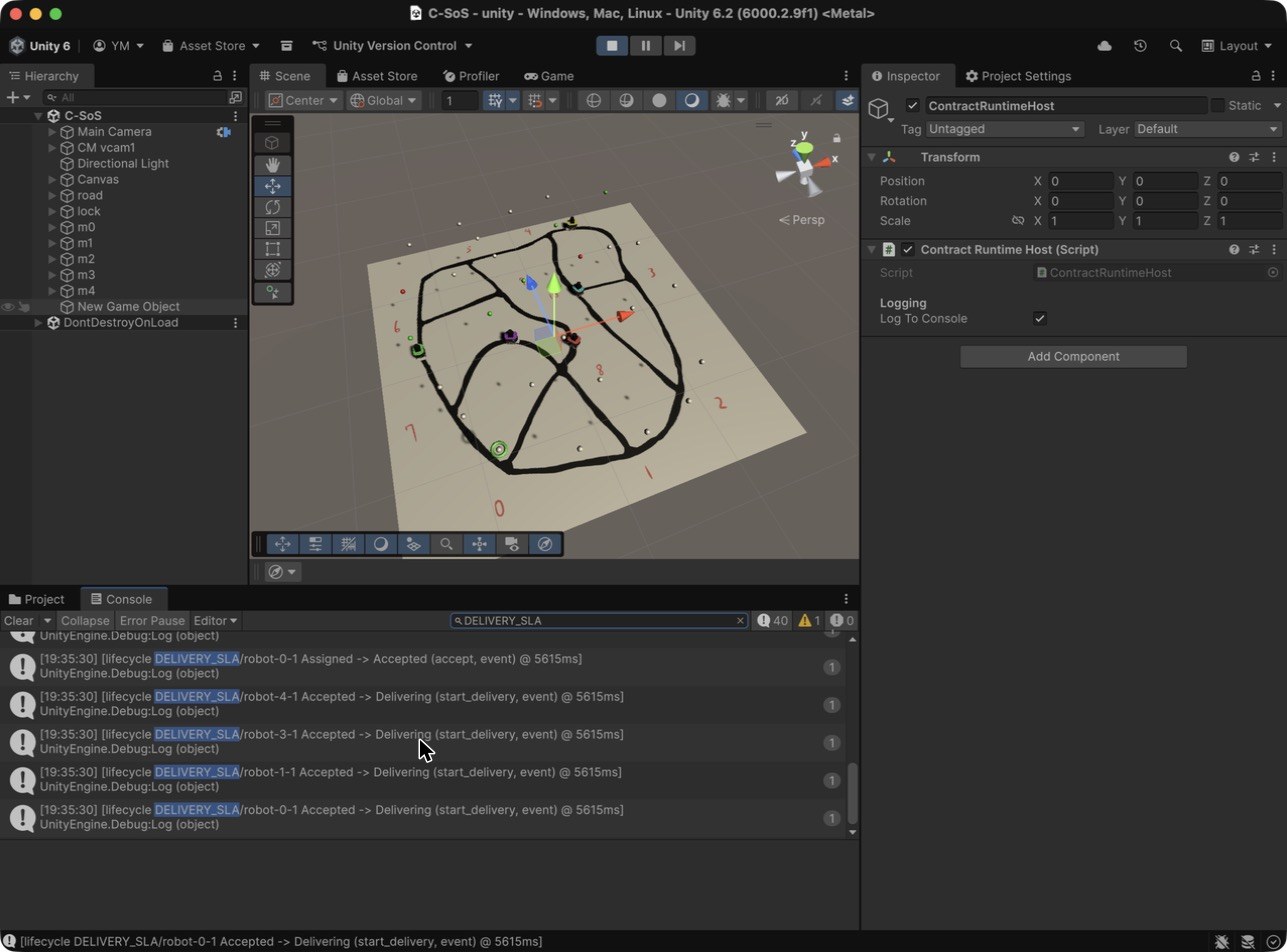
The screenshot was taken a few seconds into Play, with DELIVERY_SLA typed in the Console search box and the Scene tab selected. In this capture the Hierarchy still lists the object of step 6.3 as "New Game Object" although the Inspector shows its name, ContractRuntimeHost; on your screen both show ContractRuntimeHost.
A closer look at the road during the same run, with the five robots on their way:
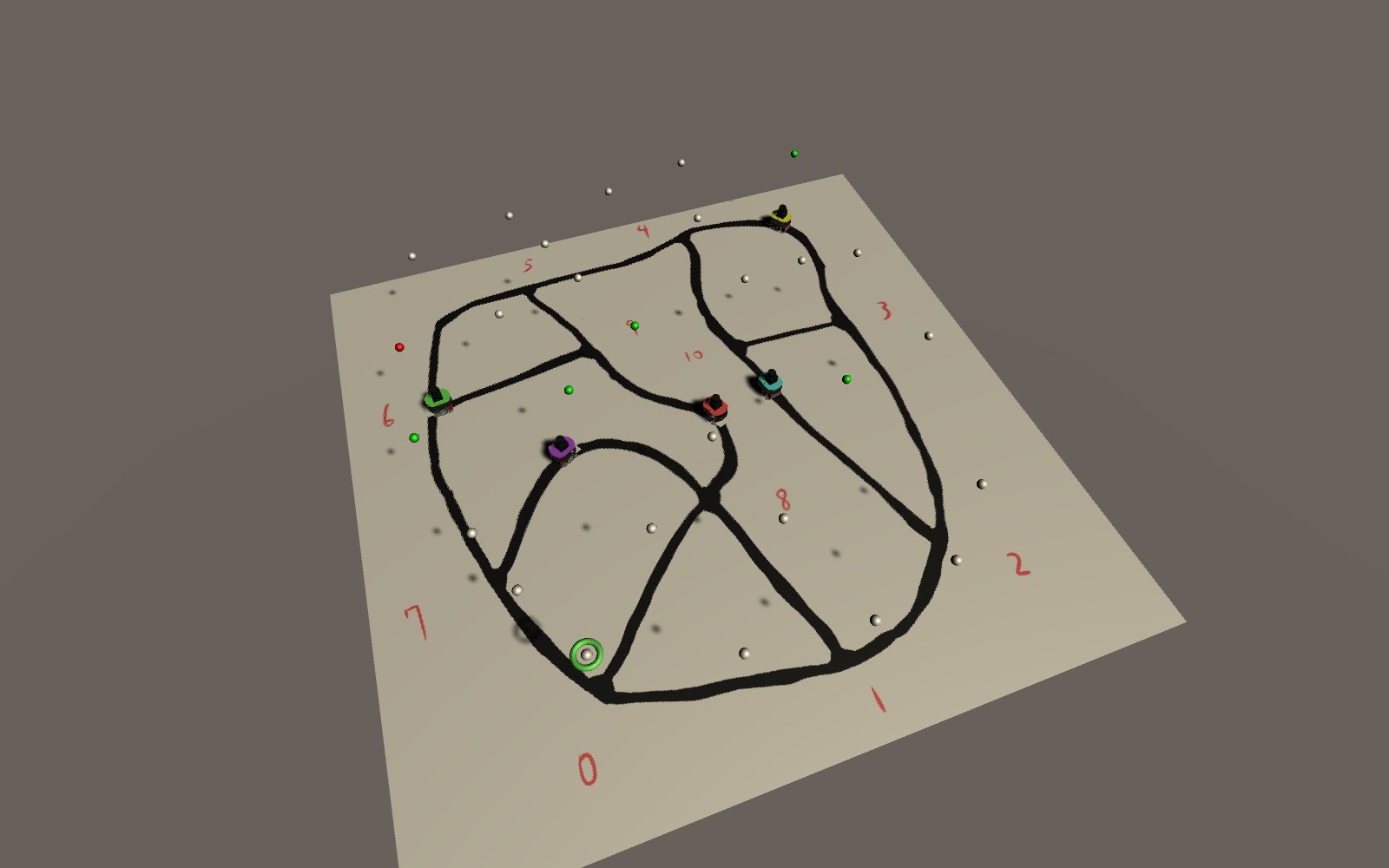
The Game view during Play: the camera follows robot m1, and the small picture in the corner is what that robot's camera sees.
[lifecycle DELIVERY_SLA/robot-0-1 Proposed -> Assigned     (assign,        event)   @ 1234ms]
[lifecycle DELIVERY_SLA/robot-0-1 Assigned -> Accepted     (accept,        event)   @ 1934ms]
[lifecycle DELIVERY_SLA/robot-0-1 Accepted -> Delivering   (start_delivery,event)   @ 1980ms]
[lifecycle DELIVERY_SLA/robot-0-1 Delivering-> Completed   (complete,      event)   @ 8341ms]

[lifecycle DELIVERY_SLA/robot-2-1 Proposed -> Assigned     (assign,        event)   @ 2050ms]
[violation DELIVERY_SLA/robot-2-1 battery_guard Major monitor:battery_guard         @ 2150ms]
[lifecycle DELIVERY_SLA/robot-2-1 Assigned -> Violated     (<jump>,        monitor) @ 2150ms]
Note the 700 ms between assign and accept for robot-0-1: that is the Assigned Dwell Ms set in 6.4.
Check 6
Confirm all of these:
| Check | Expected |
|---|---|
There are [lifecycle ... robot-{id}-1 ...] events for all five robots | Yes |
The robot with battery 15 has a monitor:battery_guard violation | Yes |
Every robot's first transition is Proposed -> Assigned | Yes |
Each robot gets from Proposed to Assigned within roughly 10 seconds (not instantly — there is a claim delay) | Yes |
| The same kinds of events as Step 5's Python run (lifecycle transitions, violations) appear with the same meaning | Yes |
Common mistakes
| Symptom | Fix |
|---|---|
Console: [PilotContractBridge X] ContractRuntimeHost.Instance is null | You forgot to place the host. Redo Step 6.3. |
| Console silent — no contract events at all | NATS or arbitrator not running. Check that Terminal 1 shows Server is ready and Terminal 2 shows the [Config] … taskArbitration.enabled=true … line. |
No delivery is ever assigned (no WON delivery in the Console) | The arbitrator probably did not load its config. Restart it passing the absolute path of cadl_config.json via -config, and confirm taskArbitration.enabled=true in its startup output (the shipped config already has it true). |
Compile error in Console after Play: The name 'CADL.SosDsl.Demo.ContractRuntimeHost' could not be found | Generated/Runtime files not picked up. Re-run the e2e script. Or in Unity, Assets ▸ Reimport All. |
All robots stay Proposed, then get Violated by deadline_watch (~5 min) | The arbitrator carried over state from the previous Play (no deliveries offered). Stop Play, restart the arbitrator (and NATS if unsure), then replay. It must be restarted before every Play (see the note in 6.1). |
Compile error ... already contains a definition for ... with paths under Generated/Generated/… or Runtime/Runtime/… | The generated tree was copied nested (duplicated). Delete Assets/Scripts/SoSDsl/Generated/Generated and Runtime/Runtime (the current e2e script self-heals this). |
| The battery=15 robot also completes instead of violating | The bridge fired assign and accept in the same frame, so the contract never dwells in Assigned long enough for the periodic battery_guard to sample. The shipped PilotContractBridge fixes this via assignedDwellMs (default 700 ms); if you replace the bridge, keep it above the monitor period. |
Recap
You have just witnessed the end-to-end story of an SoS contract: written in CADL, lowered to IR, generated to C#, executed in a real-time simulation, and observed detecting missed deadlines and battery-rule violations and moving the affected contract instances to Violated. (The runtime detects and records violations; it does not prevent the robots from misbehaving.)
Wrap-up — What did we just learn?
| Layer | We wrote | We didn't write |
|---|---|---|
| Spec | a CADL file of about 100 lines (Steps 2 & 3) | nothing — the spec was the only source |
| IR | nothing | generated JSON (245 lines for the bundled example) |
| Visualisation | nothing | the Lifecycle View page |
| Implementation | nothing | generated Unity C# (770 lines for the bundled example) |
| Runtime semantics | nothing | a working state machine + monitors + deadline timers |
Why does this matter for SoS? The same specification powers everything: the docs, the diagram, the simulation, the code. When the specification changes — say, you tighten the deadline from 5s to 3s — you edit one file and re-run the generation commands (cadl sim-ir, cadl codegen, or the e2e script); the IR, the diagram and the generated C# then all follow from that single source, with no second copy of the rule to edit by hand. Keeping one source for all of them helps keep a large SoS design maintainable.
What's next?
The hands-on ends here, but the practice exercises continue in a separate booklet:
It has two parts:
- Part 1 — Robot Delivery course: 5 sessions with 19 exercises in total (graded ★ to ★★★), plus one optional advanced exercise. They rebuild and then modify the system you just built one axis at a time — tighter deadlines, new monitors, new lifecycle states, reward execution, a violation-trace view.
- Part 2 — Modelling a new SoS end-to-end (Course C): an open-ended, self-directed track given as an outline. Pick a different domain (food delivery, smart traffic, data sharing between organisations, …), write its CADL from a blank page, exercise it with a small simulation harness of your choice (a Python discrete-event harness such as SimPy is the suggested default), and compare results across parameter sweeps.
Pick whichever fits your goal: solidifying what you learned (Part 1) or trying the workflow on a fresh problem (Part 2).
Reference
| Topic | File |
|---|---|
| Language reference | cadl-spec/docs/spec/ (Appendix E for today's content) |
| Parser implementation | cadl_repo/src/cadl/parser.py |
| IR | cadl_repo/src/cadl/sim/ir.py, cadl_repo/src/cadl/sim/lower.py |
| Unity C# generator | cadl_repo/src/cadl/codegen/unity_csharp/ |
| Python reference runtime | cadl-raspimouse-simulator/cadl/runtime/ |
| Lifecycle visualiser | cadl-explorer/cadl_sim/sos_dsl/ |
| End-to-end script | cadl_repo/scripts/sos_dsl_handson_e2e.sh |
Glossary
| Term | Meaning |
|---|---|
| SoS | System of Systems — a system whose parts are themselves operationally independent systems. |
| Actor | An autonomous participant in the SoS (robot, dispatcher, customer). |
| Contract | A class of normative agreement between named parties. |
| Contract instance | A concrete in-flight execution of a contract (one per delivery request). |
| Lifecycle | The state machine a contract instance progresses through. |
| Monitor | A declarative observation rule attached to a contract. |
| Deadline | A timing constraint expressed as deadline: <duration> on a transition. |
on_violation | What the runtime does when a transition's deadline expires. Its transition: names the target state the instance is moved to (e.g. Violated), not a transition id. |
on_match | What the runtime does when a monitor's rule holds. Its transition: likewise names the target state (e.g. Violated); violation: names a violation to record. |
| Severity | Classification of a violation: Minor / Major / Critical. |
| IR | Intermediate Representation — the JSON between parser and codegen. |
| Codegen target | A code generation backend, e.g. python, solidity, unity-csharp. |
| Bridge | A MonoBehaviour translating Pilot state changes into contract events. |