Chapter 7 — Generating code and running the reference runtime
This chapter generates Unity C# code from the specification and runs the same IR in the Python reference runtime to check the results (about 15 minutes). In the exercises you change a deadline or the environment, predict the outcome, and then observe it.
7.1 What you'll learn
In the procedure:
- How a single CLI command turns your CADL into a Unity-ready C# tree.
- Why there are two runtimes with the same semantics: a Python reference runtime that interprets the IR, and the generated C#.
In the exercises:
- Run the Python reference runtime against your spec, multi-robot.
- Read NDJSON traces and aggregate them into per-robot summaries.
- Vary one parameter at a time and predict before observing.
7.2 Background
The reference runtime as a test bench
The Python runtime in cadl-raspimouse-simulator/cadl/runtime/ consumes the IR and gives you deterministic, replayable discrete-time simulation. The five-robot multi_robot_demo.py is your fixed test bench:
| Robot | Scripted outcome | Why it matters |
|---|---|---|
| robot-0-1 | Completed | sanity check that happy path works |
| robot-1-1 | Violated via deadline:accept | demonstrates detection of a missed deadline |
| robot-2-1 | Violated via monitor:battery_guard | demonstrates periodic monitor |
| robot-3-1 | Violated via monitor:deadline_watch | demonstrates declarative monitor |
| robot-4-1 | stays Proposed | demonstrates "instance never advances" is also a valid trace |
This is your ground truth to validate any spec change you make.
The table describes the bundled fixture, which declares both monitors, battery_guard and deadline_watch. When you run the demo on your own IR (--ir, from Exercise 7.2 on), a monitor your file does not declare cannot fire. With the v2 of Chapter 5, which has battery_guard but no deadline_watch, robot-3-1 ends in Delivering with no violation, not in Violated. If your v2 has no battery_guard either, robot-2-1 is still Violated, but via deadline:accept.
7.3 Procedure
The repo provides a single end-to-end script. Run it:
cd ~/program/cadl_repo
./scripts/sos_dsl_handson_e2e.sh \
    examples/sos_dsl_robot_delivery.cadl \
    --unity ../cadl-raspimouse-simulator/unity
Without the simulator repository you can still run the pipeline up to code generation: pass
--unity ""and the script stops after generating the C# tree underoutput/sos_dsl_handson/.Replace the input with
my_delivery.cadlif you want to use your own specification — note that your file will need alifecycle.transitions[*].on:matching the bridge's event names, so for the very first run we recommend the bundled example.
7.4 Expected output
$ ./scripts/sos_dsl_handson_e2e.sh examples/sos_dsl_robot_delivery.cadl \
      --unity ../cadl-raspimouse-simulator/unity

== INPUT ==
  source : .../examples/sos_dsl_robot_delivery.cadl
  size   : 153 lines

== Step 1/4 — parse + type-check (cadl check) ==
  OK

== Step 2/4 — emit Sim-IR JSON (cadl sim-ir) ==
  output/sos_dsl_handson/sos_dsl_robot_delivery.ir.json
  contracts : 1
  states    : 7
  monitors  : 3

== Step 3/4 — codegen Unity C# (cadl codegen --target unity-csharp) ==
  output    : output/sos_dsl_handson/unity-csharp
  runtime   : 5 files
  generated : 3 files
  total lines : 783

== Step 4/4 — drop into ../cadl-raspimouse-simulator/unity/Assets/Scripts/SoSDsl/ ==
  installed: .../Runtime, .../Generated
  preserved: .../Demo (if it existed)

== DONE ==
Next steps for the student:
  1. Open the Unity project at .../unity in Unity 6 (6000.2)
  2. Open Assets/Scenes/C-SoS.unity
  3. Add a ContractRuntimeHost GameObject (Demo/ContractRuntimeHost)
  4. Attach PilotContractBridge to each robot that has Pilot_CSoS
  5. Press Play and watch the Console for [lifecycle ...] / [violation ...]

See the textbook for the full walkthrough (Chapter 8 covers these steps):
  https://www.ertl.jp/cadl-spec/docs/textbook/
Look at the generated tree:
output/sos_dsl_handson/unity-csharp/
├── Runtime/                          # constant per generation, common to all contracts
│   ├── Severity.cs                   # enum Minor / Major / Critical
│   ├── ContractEvent.cs              # struct used for both lifecycle & violation events
│   ├── EventBus.cs                   # tiny FIFO publish-subscribe
│   ├── PredicateEvaluator.cs         # CADL expression evaluator (mirrors the Python one)
│   └── ContractRuntime.cs            # registry + tick loop
└── Generated/                        # one set of files per CADL contract
    ├── DeliverySlaState.cs           # public enum DeliverySlaState { Proposed, Assigned, ... }
    ├── DeliverySlaContract.cs        # IContractInstance impl for DELIVERY_SLA
    └── DeliverySlaMonitors.cs        # one Eval_xxx method per monitor
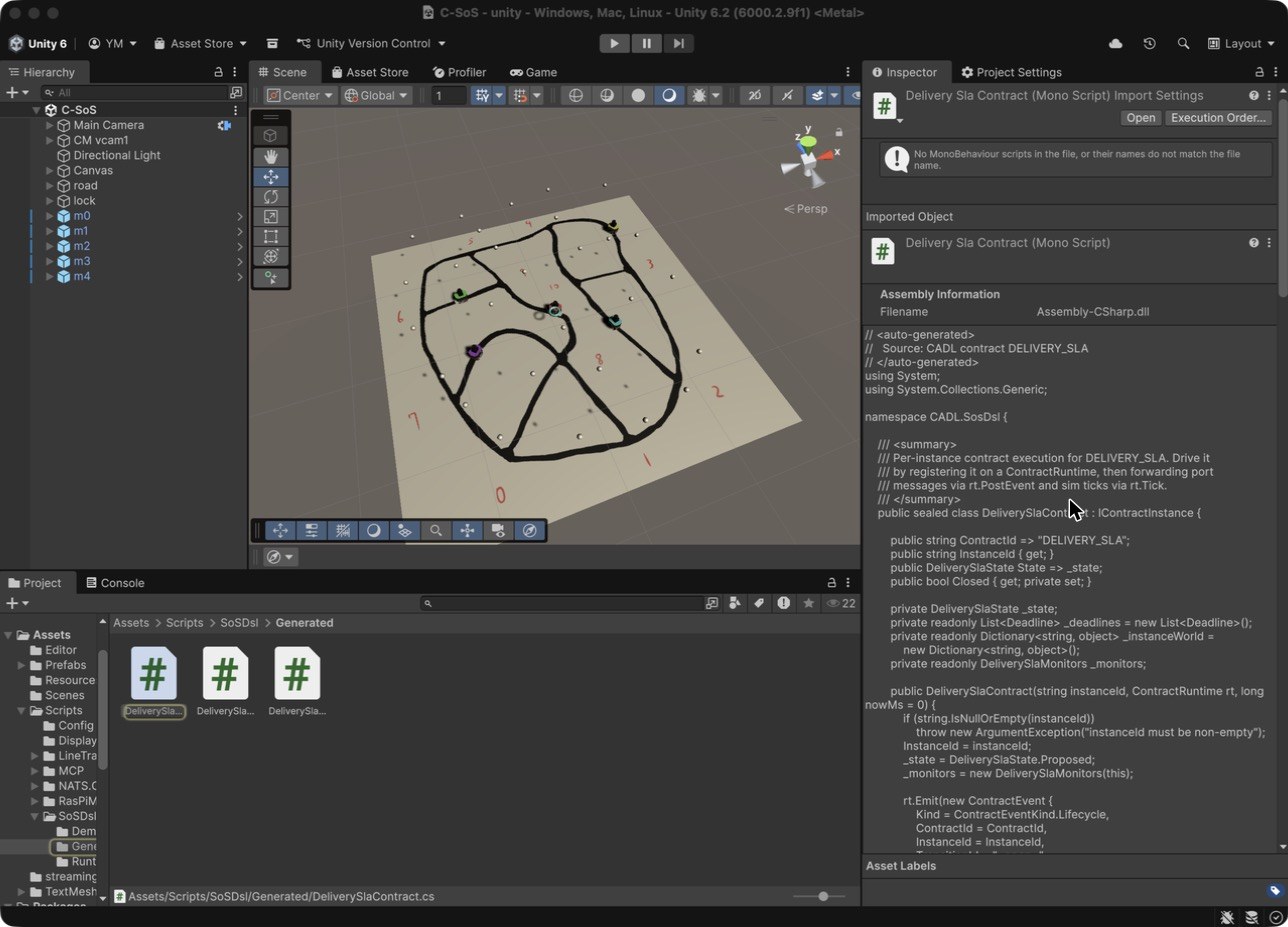
After the script has run, the generated files are in the Unity project. Open the project in Unity (Section 8.2 describes how) and look at the Project window: they appear under Assets/Scripts/SoSDsl/Generated. Selecting DeliverySlaContract shows the generated C# in the Inspector (you do not edit this file; it is overwritten every time you regenerate):
7.5 Why two runtimes?
The same IR drives both, in different ways. The Python reference runtime (cadl/runtime/engine.py in the simulator repository) is a hand-written interpreter that loads the IR JSON when it starts; the C# contract classes are generated from the IR by cadl codegen:
                             ┌──────────────────────┐
                             │ multi_robot_demo.py  │ ← run today as Python
                             │ (Python runtime)     │
                             │                      │
                  ┌──────────┘                      │
   IR JSON ──────►│                                 │
                  └──────────┐                      │
                             │ DeliverySlaContract  │ ← run later in Unity
                             │ (Unity / C#)         │
                             └──────────────────────┘
If both runtimes are correct, they must produce the same trace for the same inputs. We can sanity-check this without Unity:
cd ~/program/cadl-raspimouse-simulator
python3 -m cadl.runtime.multi_robot_demo --summary
$ python3 -m cadl.runtime.multi_robot_demo --summary
# multi_robot_demo summary (20 events)
  robot-0-1     state=Completed     violations=[(none)]
  robot-1-1     state=Violated      violations=[deadline:accept]
  robot-2-1     state=Violated      violations=[monitor:battery_guard]
  robot-3-1     state=Violated      violations=[monitor:deadline_watch]
  robot-4-1     state=Proposed      violations=[(none)]
Five robots, five different outcomes. This is a scripted Python scenario, built so that every outcome a contract can reach (normal completion, deadline violation, monitor violation, still unassigned) is visible in a single run.
The Unity run in Chapter 8 assigns deliveries at different times and gives the robots different battery settings, so these five rows will not be reproduced as-is (in Unity, typically the one robot whose battery you lowered violates via battery_guard while the rest progress to Completed). What you should be matching is not the per-robot outcomes but the mechanism — that the same lifecycle transitions, deadline, and monitor behave with the same meaning.
🛠 Troubleshooting:
multi_robot_demonot foundRun the command from the root of
cadl-raspimouse-simulator. Python findscadl.runtimerelative to the current directory; from anywhere else it finds only thecadlcompiler package, which has noruntimemodule, and reportsNo module named cadl.runtime.To look at one contract instance at a time,
demo_deliveryexercises the same three mechanisms (happy path, deadline violation, monitor violation) on one contract instance (its output is for a single contract, so its shape differs from the 5-robot table above):
7.6 Inside the generated code and the reference runtime
Following the bundled example examples/sos_dsl_robot_delivery.cadl (153 lines), this section traces where one line you write ends up. You do not need it to follow the procedure; read it when you want to know what the commands produced.
(1) Spec → IR. The deadline: 5s in your .cadl file is parsed by cadl_repo/src/cadl/parser.py, and once sim/lower.py lowers it into the IR it becomes the JSON "deadline_ms": 5000 (the whole IR is 245 lines). The IR is an intermediate representation that discards the "human-friendly notation" and keeps only the "form that machines can easily execute".
(2) IR → C#. codegen/unity_csharp/contract_emitter.py reads the IR and generates three files per contract: the state enum (DeliverySlaState.cs), the state machine itself (DeliverySlaContract.cs), and the monitoring rules (DeliverySlaMonitors.cs). Together with 5 shared runtime files (listed below), a total of 783 lines is placed under unity/Assets/Scripts/SoSDsl/.
The generated C# — unity/Assets/Scripts/SoSDsl/
| File | What it contains | Approx. lines |
|---|---|---|
Runtime/ContractRuntime.cs | Instance registration, event delivery (to one instance or to all), the Tick loop. The heart of the system | ~100 |
Runtime/PredicateEvaluator.cs | Evaluator for predicate strings like "battery < 20 AND state == Assigned" | ~250 |
Runtime/ContractEvent.cs | Shared struct for lifecycle / violation events. The Console lines come from its ToString() | ~40 |
Runtime/EventBus.cs / Severity.cs | Lightweight pub-sub and the severity enum | Small |
Generated/DeliverySlaContract.cs | The transition table itself. Rows of if statements: "when this event arrives in this state, go to that state" | ~220 |
Generated/DeliverySlaMonitors.cs | Monitoring rules. Evaluates a predicate on each period (e.g. 500ms) and emits a violation if true | ~100 |
The Python reference runtime — cadl/runtime/ (for cross-checking)
| File | What it contains |
|---|---|
engine.py | A Python implementation with the same semantics as the C# runtime (~720 lines). Reads the IR and drives state machines, deadlines, and monitors |
multi_robot_demo.py | A scripted run in which 5 robots reach 5 different outcomes (completed, response deadline expired, battery violation, delivery delay, unassigned) |
Reading the code (optional, about 30 minutes)
- Read
examples/sos_dsl_robot_delivery.cadlfrom top to bottom (10 min). It is heavily commented, and it doubles as the answer key for Chapters 4–5. - Read
HandleEventinGenerated/DeliverySlaContract.cs(10 min) and confirm that the transitions of the.cadlfile becameifstatements as they are. - Read
ContractRuntime.tickinengine.py(10 min).
7.7 Check
cd ~/program/cadl_repo
pip install pytest          # once; Chapter 2 does not install it
PYTHONPATH=src python3 -m pytest tests/test_unity_csharp_structural.py -q
# 9 passed
These nine tests catch the structural bugs that would prevent Unity from compiling the generated C# (mismatched braces, missing namespaces, name collisions, etc.). If they fail, the codegen has a regression.
7.8 Recap
You now have:
-
A 245-line Sim-IR JSON (for the bundled example).
-
A 783-line Unity-ready C# tree, dropped into the Unity project.
-
A Python proof-of-concept showing what the C# trace must look like once it runs.
7.9 Exercises
Exercise 7.1 (★) — Capture the baseline
Goal: Run multi_robot_demo --summary against the bundled fixture (not your my_delivery_v2.cadl — yet), capture the output verbatim, and explain each row.
Procedure:
cd ~/program/cadl-raspimouse-simulator
python3 -m cadl.runtime.multi_robot_demo --summary > session4_baseline.txt
python3 -m cadl.runtime.multi_robot_demo --log session4_baseline.ndjson
Check: All five robots' final states match the table above.
Exercise 7.2 (★★) — Tighten the deadline
Goal: Shorten the accept deadline in my_delivery_v2.cadl step by step — 5s → 1s → 100ms → 50ms — and find the point at which the outcome changes. Does any robot still complete?
Procedure:
-
Edit
my_delivery_v2.cadl, changedeadline: 5stodeadline: 1son theaccepttransition (the scenario's time scale is milliseconds: the robots acknowledge about 100 ms after assignment). -
Regenerate the IR and run the demo on it with the
--iroption (without--irthe demo loads the bundled fixture):cd ~/program/cadl_repocadl sim-ir my_delivery_v2.cadl --format json > my_delivery_v2.ir.jsoncd ~/program/cadl-raspimouse-simulatorpython3 -m cadl.runtime.multi_robot_demo --ir ~/program/cadl_repo/my_delivery_v2.ir.json --summary -
Compare the summary with the one you get from the same file with
deadline: 5s, then repeat steps 1–2 with100msand50ms. With the v2 of Chapter 5 you should see:deadlineWhat changes 5s,1sNothing: the summaries are identical. The deadline is not what limits these runs. 100msrobot-2-1is stillViolated, but the cause changes frommonitor:battery_guardtodeadline:accept— the deadline now fires before the monitor does.50msNo robot completes: robot-0-1torobot-3-1are allViolatedwithdeadline:accept.my_delivery_v2.cadlhas nodeadline_watchmonitor and nolate_failuretransition, sorobot-3-1ends inDeliveringinstead ofViolatedat5s,1sand100ms: your own v2 reproduces four of the five outcomes of the bundled example.
Reflection: An overly tight deadline (50ms here) turns every contract into a violation, regardless of effort. An overly loose one (5s and 1s behave the same) masks misbehaviour. What process would you use to pick a deadline value for a real SoS? (Hint: data from baseline runs, plus a target false-positive rate.)
Exercise 7.3 (★★) — Modify world parameters
Goal: Run the same scenario but with different per-instance battery / speed / deadline values. Capture how the violation pattern changes.
Procedure: Make a copy of multi_robot_demo.py, modify _seed_battery(...) and update_instance_world(...) calls, run with --summary. Try at least three configurations.
Submit: A small table showing config-name → terminal-state-per-robot.
Using this chapter in a class
Before the session.
my_delivery_v2.cadland its IR.- (Optional)
violation_trace_view.pyfrom Chapter 6.
Wrap-up and homework.
Bring to the next session (Chapter 9):
session4_baseline.txt+session4_baseline.ndjson.- Your
multi_robot_demoparameter-sweep table (3+ configurations). - 1 sentence: which violation pattern surprised you most, and why?