Chapter 8 — Running the simulation in Unity
This chapter puts the generated contract code into the Unity robot-swarm simulation and watches violations being detected in the running simulation (about 15 minutes).
8.1 What you'll learn
- How to wire
ContractRuntimeHostandPilotContractBridgeinto an existing scene. - How to read live contract events in the Unity Console.
8.2 Procedure
Start NATS and the arbitrator
In two separate terminals:
# Terminal 1 — NATS message broker
nats-server -p 4222
[INFO] Starting nats-server
[INFO] Server is ready
[INFO] Listening for client connections on 0.0.0.0:4222
# Terminal 2 — C-SoS arbitrator (Go)
cd ~/program/cadl-raspimouse-simulator/arbitrator/C-SoS/main
go run .
[Config] Loaded from ../../../unity/Assets/streamingAssets/cadl_config.json: nats_url=nats://localhost:4222 numAgents=5
[Config]   init=init next=next ret=ret fin=fin disp=disp resource=resource
[Config]   taskArbitration.enabled=true protocol=fcfs intervalSec=5.0
If that third line reads taskArbitration.enabled=true, the arbitrator has loaded its configuration and is ready to start handing out deliveries. If it says false, or the [Config] lines do not appear at all, the config file was not read — pass its absolute path with -config as shown in the note below. A further line, [Motivation] Disabled (baseline behavior), follows; it only says that the motivation extension is off.
🛠 Restart the arbitrator before every Play (important)
The Go arbitrator initializes robot count and delivery state once at startup and does not reset when you stop and re-enter Play in Unity. It keeps the previous session's "busy / assigned" state and stops broadcasting new deliveries, so all robots stay
Proposedand getViolatedbydeadline_watchafter ~5 minutes. Restart the Terminal-2 arbitrator (Ctrl+C, then re-run) before every Play (restart NATS too if unsure). Start order is always NATS → arbitrator → Unity Play.Pass the config as an absolute path to be safe (the default is relative and depends on the launch directory):
If
[Config] … taskArbitration.enabled=true …prints at startup, the config loaded correctly.
Open the C-SoS scene
- Launch Unity Hub. Open
~/program/cadl-raspimouse-simulator/unitywith Unity 6000.2.9f1 (Unity 6.2). - First open takes several minutes (package download and Library import).
- In the Project pane, double-click
Assets/Scenes/C-SoS.unity.
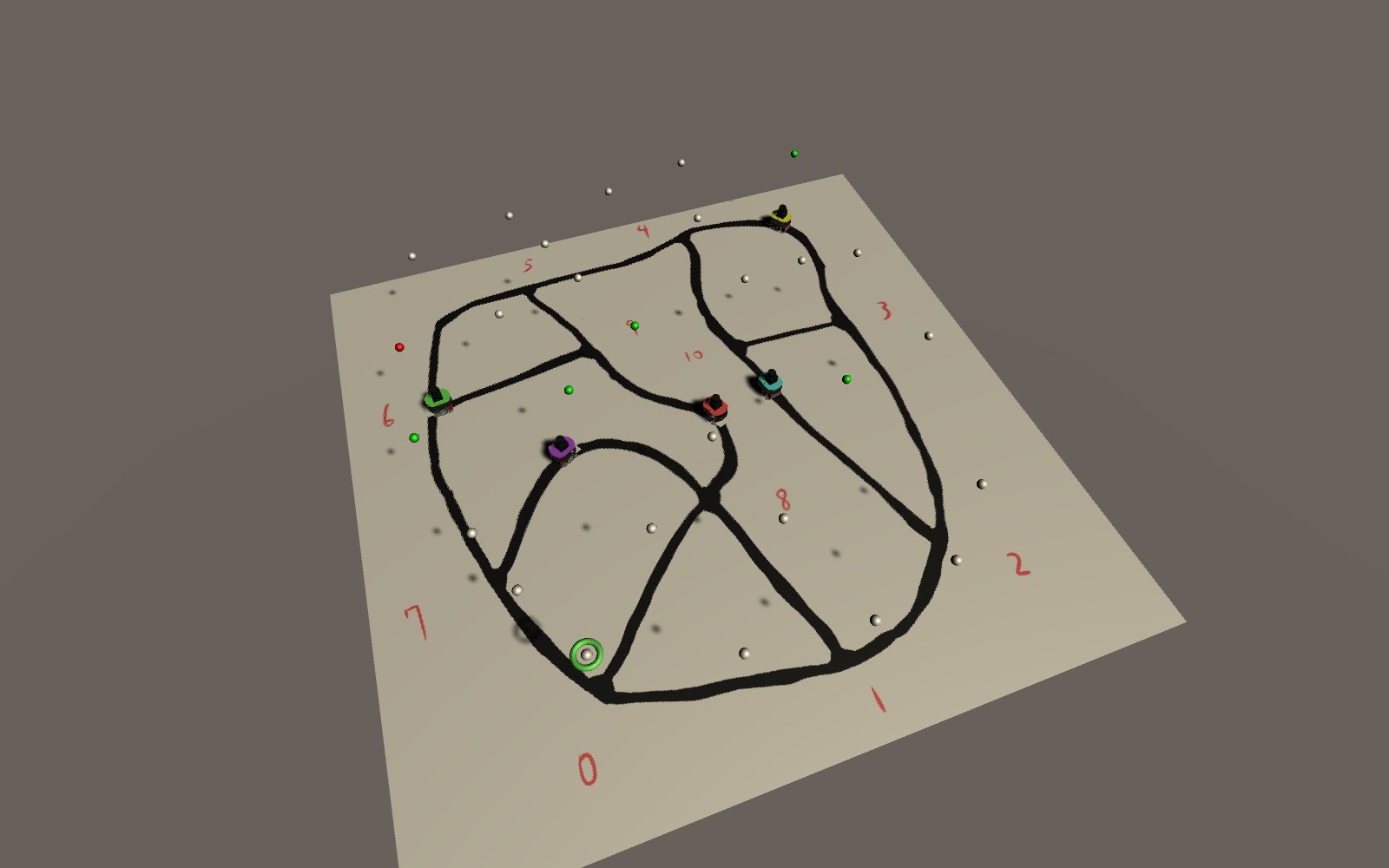
You should see a road network (graph) made of 11 nodes and 17 edges, with five robots — Red / Blue / Green / Yellow / Purple — driving on it. The node count, edge count, and robot count are all loaded from Assets/streamingAssets/cadl_config.json, so the Console also prints [GraphDefinition] Loaded from CADL config: 11 nodes, 17 edges. (The grid_size: 30 under context.environment in the CADL file is an abstract environment parameter that is carried into the IR; the Unity scene does not read it — its road graph is the one defined in cadl_config.json.)
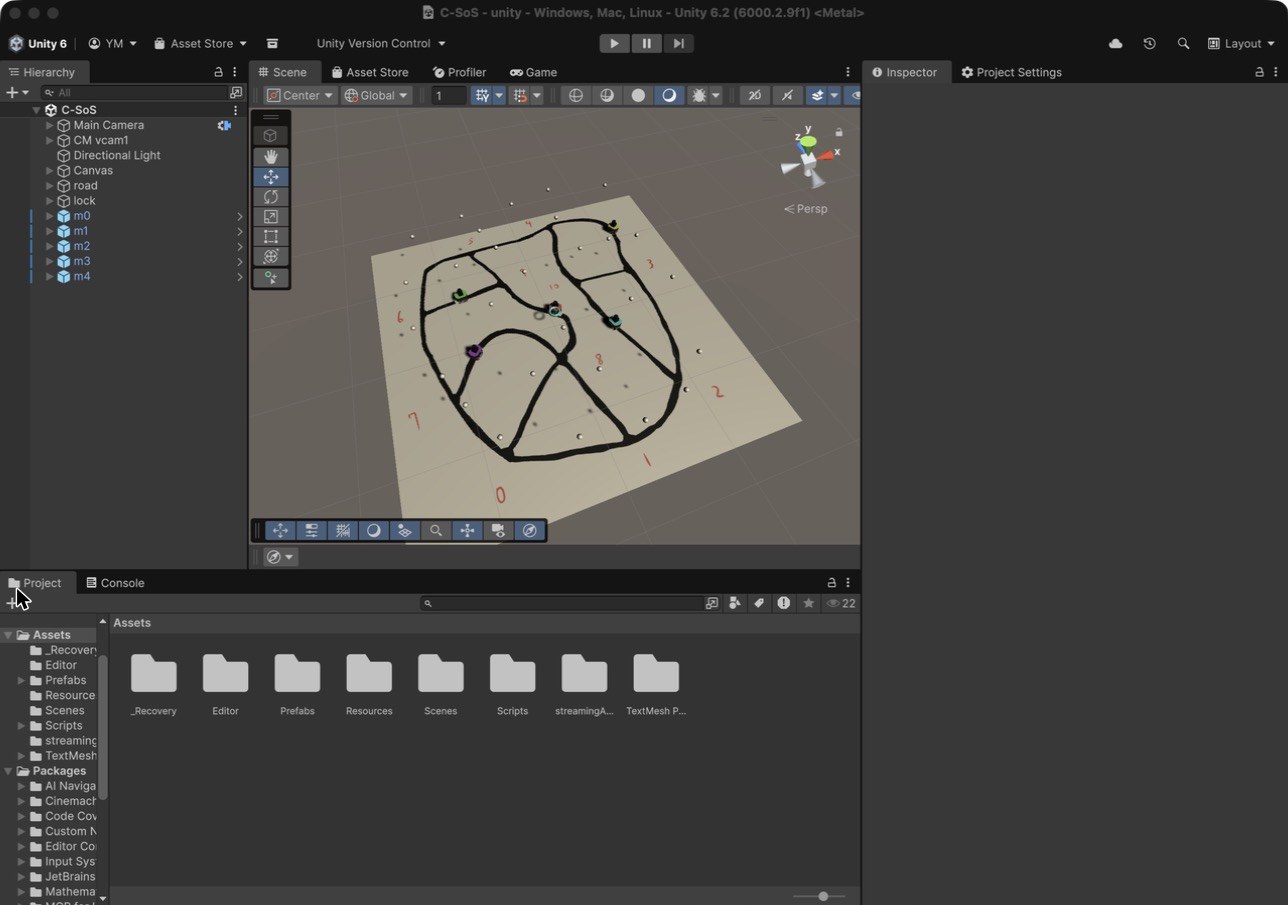
If the road looks small in the Scene view, select road in the Hierarchy, move the mouse over the Scene view and press F to frame it. During Play, the Game view follows one robot (m1) and shows the road around it, with that robot's own camera in the lower-right corner; the Scene view is where you can look at the whole road at once.
🛠 Mind the Unity version
The project is saved with Unity 6000.2.9f1 (recorded in
ProjectSettings/ProjectVersion.txt), and this textbook is checked with that version. Install it from Unity Hub; when you add the project, Unity Hub offers to install the matching Editor if it is missing.Do not open the project with Unity 2022.3 or older:
Packages/manifest.jsonlists packages that exist only in Unity 6. A newer Unity 6 release will ask to upgrade the project on first open; that has not been checked for this textbook.
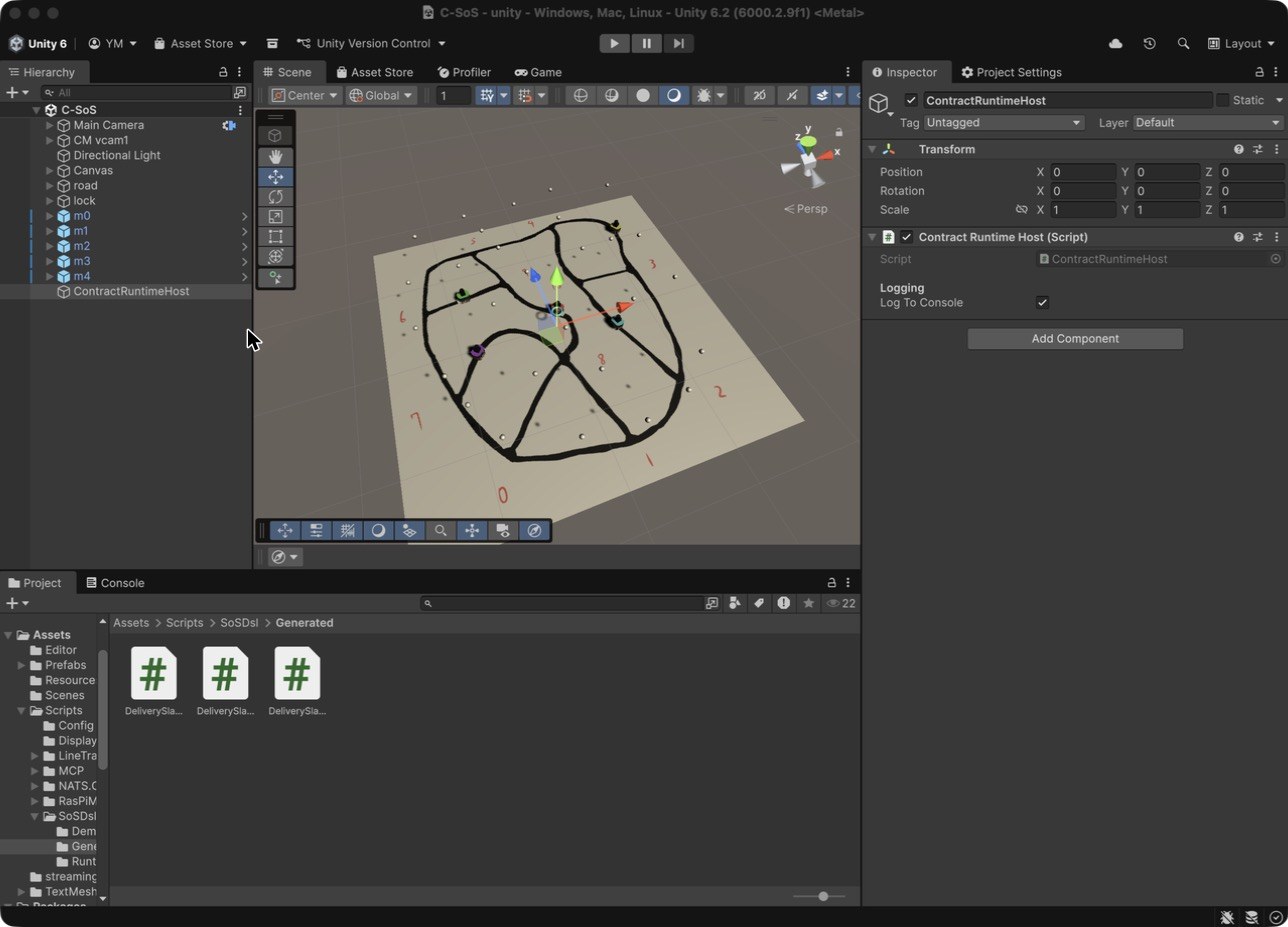
Add ContractRuntimeHost (one per scene)
Hierarchy ▸ Right-click ▸ Create Empty
Rename it to:        ContractRuntimeHost
Inspector ▸ Add Component ▸ search "ContractRuntimeHost" ▸ select  CADL.SosDsl.Demo.ContractRuntimeHost
Inspector:
Contract Runtime Host (Script)
└── Logging
    └── Log To Console   ☑  (leave checked)
Add PilotContractBridge to every robot
In the Hierarchy search box type Pilot_CSoS. Five robots will be filtered.
For each one:
Inspector ▸ Add Component ▸ "PilotContractBridge" (CADL.SosDsl.Demo.PilotContractBridge)
The Inspector now shows:
Pilot Contract Bridge (Script)
└── World keys (must match the contract's predicates)
    ├── Robot Battery       [───────●───] 90
    ├── Request Deadline Ms              300000
    └── Assigned Dwell Ms                700
Assigned Dwell Msis the minimum time the contract dwells inAssignedbefore accepting. It gives periodic monitors gated on that state (e.g.battery_guard, sampled every 500 ms) at least one evaluation window. Leave it at the default 700 ms — setting it below the monitor period would make violations undetectable.
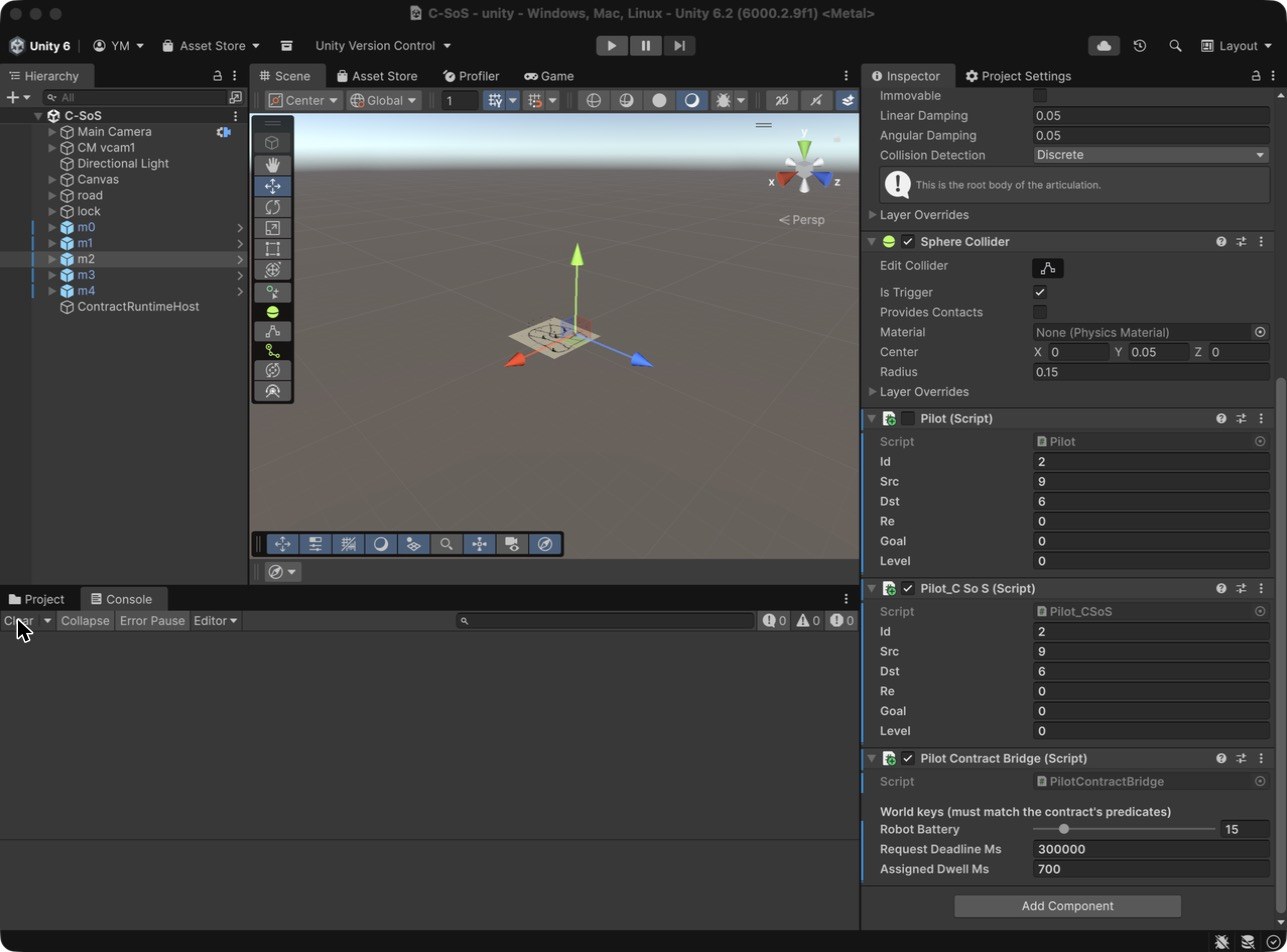
For one of the five robots, drag the Battery slider down to 15 so the battery_guard monitor will fire on that robot.
The Editor then looks like this, with the robot m2 selected and its Pilot Contract Bridge component at the bottom of the Inspector (Robot Battery 15):
Save the scene (Cmd+S / Ctrl+S).
Press Play
Click ▶ at the top of the Editor.
8.3 What you should see
In the Console, lines like the following should appear continuously. You can filter them by typing lifecycle DELIVERY_SLA or violation in the Console search box.
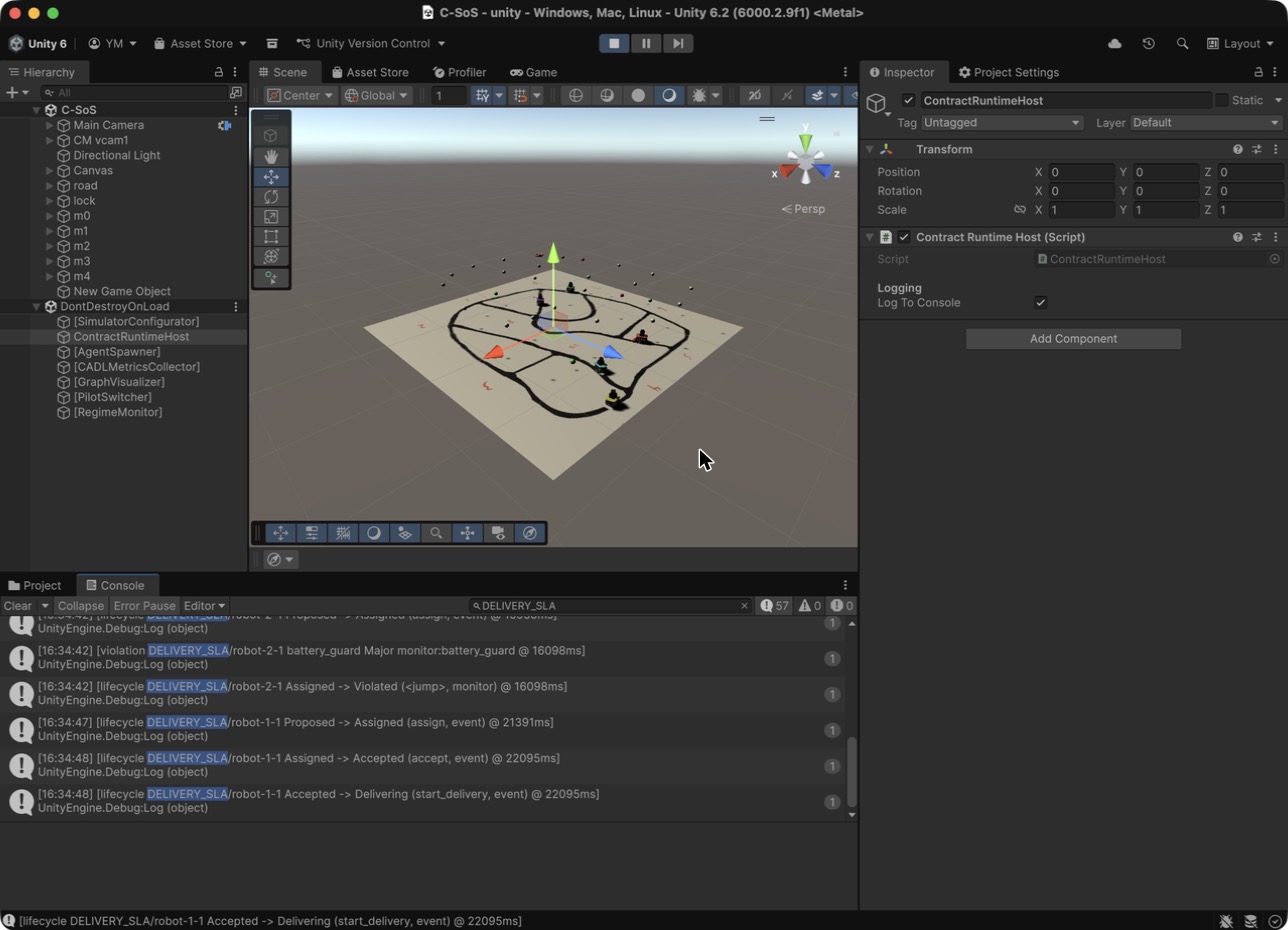
The screenshot was taken about 22 seconds into Play, with DELIVERY_SLA typed in the Console search box and the Scene tab selected: robot-2-1 (battery 15) has just been moved to Violated by battery_guard, and robot-1-1 has been assigned five seconds later. During Play the host is listed as ContractRuntimeHost under DontDestroyOnLoad; in this capture the scene part of the Hierarchy still shows the object of step 6.3 as "New Game Object", although the Inspector shows its name.
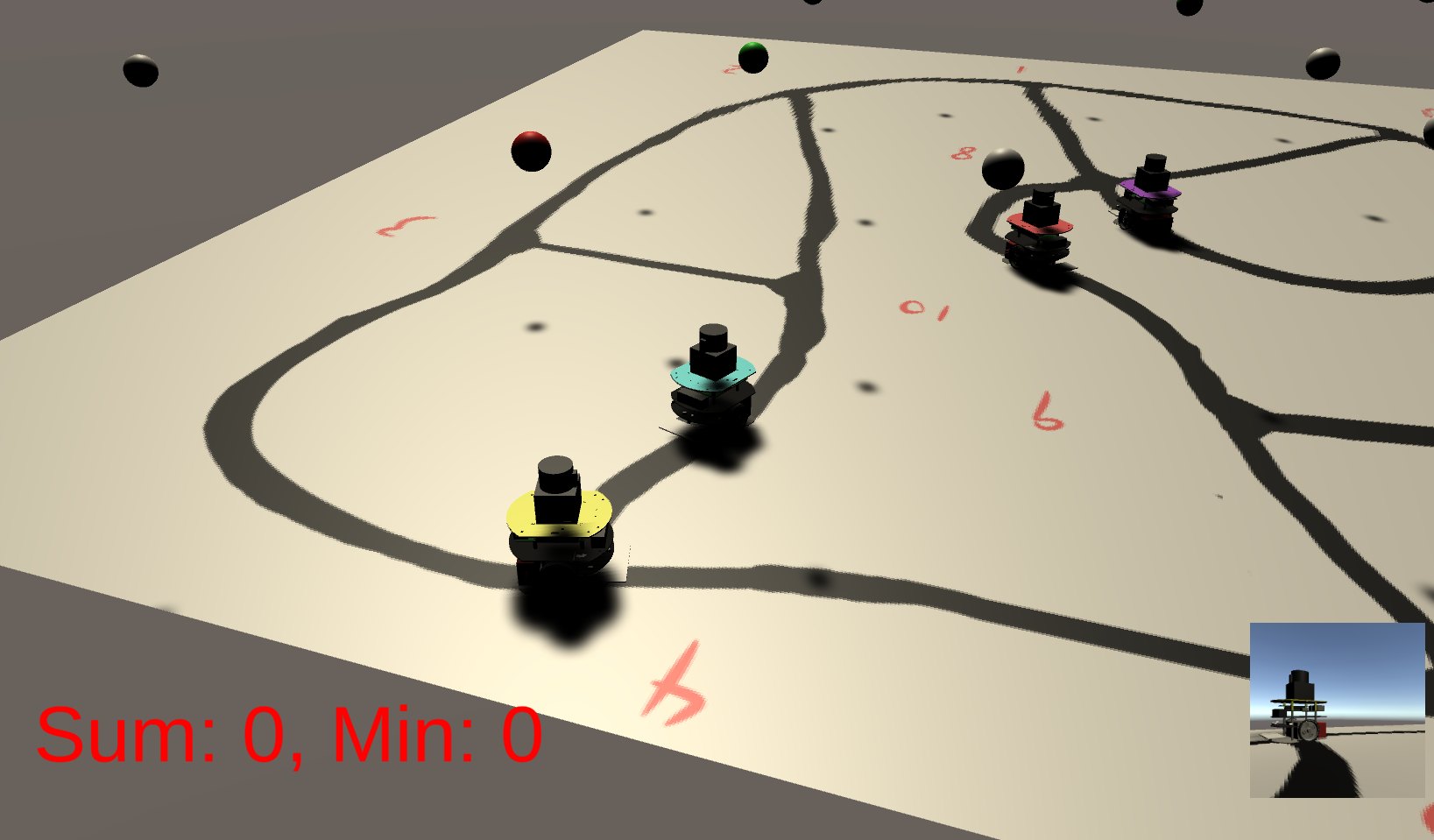
A closer look at the road during the same run, with the five robots on their way:
The Game view during Play: the camera follows robot m1, and the small picture in the corner is what that robot's camera sees.
[lifecycle DELIVERY_SLA/robot-2-1 Proposed -> Assigned (assign, event) @ 16112ms]
[violation DELIVERY_SLA/robot-2-1 battery_guard Major monitor:battery_guard @ 16112ms]
[lifecycle DELIVERY_SLA/robot-2-1 Assigned -> Violated (<jump>, monitor) @ 16112ms]

[lifecycle DELIVERY_SLA/robot-1-1 Proposed -> Assigned (assign, event) @ 21675ms]
[lifecycle DELIVERY_SLA/robot-1-1 Assigned -> Accepted (accept, event) @ 22479ms]
[lifecycle DELIVERY_SLA/robot-1-1 Accepted -> Delivering (start_delivery, event) @ 22479ms]
[lifecycle DELIVERY_SLA/robot-1-1 Delivering -> Completed (complete, event) @ 46361ms]
Each robot's contract moves only on that robot's own events. The arbitrator hands out one delivery about every 5 seconds, so the robots reach Assigned one after another (in this run at about 5, 11, 16, 22 and 27 seconds). Note the 700 to 800 ms between assign and accept for robot-1-1: that is the Assigned Dwell Ms set in 6.4. robot-2-1, with battery 15, is caught by battery_guard in the same frame as its assign.
8.4 The parts in the scene
The C# runs in Unity. The ContractRuntimeHost in the scene calls Runtime.Tick(now) every frame, evaluating deadline expirations and monitoring rules. A PilotContractBridge attached to each robot translates the robot's state changes (won a delivery bid, finished a delivery) into contract events (route_assignment, Delivered) and feeds them to that robot's own contract instance. Violations and state transitions appear line by line in the Console:
[lifecycle DELIVERY_SLA/robot-2-1 Proposed -> Assigned (assign, event) @ 16112ms]
[violation DELIVERY_SLA/robot-2-1 battery_guard Major monitor:battery_guard @ 16112ms]
Hand-written glue — SoSDsl/Demo/
| File | What it contains |
|---|---|
ContractRuntimeHost.cs | One per scene. Holds the runtime, ticks it every frame, and prints events to the Console |
PilotContractBridge.cs | One per robot. Observes Pilot_CSoS and translates into contract events. Assigned Dwell Ms (700ms) is a wait time so that the periodic monitors don't miss the Assigned state |
The simulator itself (runs independently of the contracts)
| File | What it contains |
|---|---|
LineTrace/Pilot_CSoS.cs | The robot's brain. Path following, bidding on deliveries (claim), winning bids, completion. Knows nothing about contracts |
arbitrator/C-SoS/main/main.go | The arbitrator (task dispatcher) written in Go. Distributes deliveries over NATS and awards them first-come-first-served (FCFS) |
Assets/streamingAssets/cadl_config.json | The graph (11 nodes / 17 edges), robot count, NATS settings. Read by both sides: the arbitrator's [Config] startup lines (Terminal 2) and Unity's [GraphDefinition] Loaded from CADL config line in the Console come from it |
What to touch to change what
When you feel like modifying things, there is one place to touch per goal (everything else is either generated or should not be edited by hand).
| What you want to do | What to touch |
|---|---|
| Change a deadline, add a monitor, add a state | The .cadl file (→ regenerate with the e2e script) |
| Change how robots move | Pilot_CSoS.cs (the contract side needs no change as long as the events the bridge observes stay the same) |
| Change the translation into contract events | PilotContractBridge.cs |
| Change the shape of the generated C# | contract_emitter.py (advanced) |
| Change the robot count or the map | cadl_config.json |
Places you must not touch: hand-editing the contents of Generated/ and Runtime/. The next run of the e2e script will overwrite them (if something needs fixing, fix the generator).
Reading the code (optional, about 10 minutes)
Read PilotContractBridge.cs and see how thin the translation from observation to event is.
8.5 Check
Confirm all of these:
| Check | Expected |
|---|---|
There are [lifecycle ... robot-{id}-1 ...] events for all five robots | Yes |
The robot with battery 15 has a monitor:battery_guard violation | Yes |
Every robot's first transition is Proposed -> Assigned | Yes |
The robots reach Assigned one at a time, about every 5 seconds (the arbitrator hands out one delivery at a time), so the last one takes about 25–30 seconds | Yes |
A robot's contract reaches Completed when that robot finishes its delivery; the other robots' contracts do not move with it | Yes |
| The same kinds of events as Chapter 7's Python run (lifecycle transitions, violations) appear with the same meaning | Yes |
8.6 Common mistakes
| Symptom | Fix |
|---|---|
Console: [PilotContractBridge X] ContractRuntimeHost.Instance is null | You forgot to place the host. Redo "Add ContractRuntimeHost" in Section 8.2. |
| Console silent — no contract events at all | NATS or arbitrator not running. Check that Terminal 1 shows Server is ready and Terminal 2 shows the [Config] … taskArbitration.enabled=true … line. |
No delivery is ever assigned (no WON delivery in the Console) | The arbitrator probably did not load its config. Restart it passing the absolute path of cadl_config.json via -config, and confirm taskArbitration.enabled=true in its startup output (the shipped config already has it true). |
Compile error in Console after Play: The name 'CADL.SosDsl.Demo.ContractRuntimeHost' could not be found | Generated/Runtime files not picked up. Re-run the e2e script. Or in Unity, Assets ▸ Reimport All. |
All robots stay Proposed, then get Violated by deadline_watch (~5 min) | The arbitrator carried over state from the previous Play (no deliveries offered). Stop Play, restart the arbitrator (and NATS if unsure), then replay. It must be restarted before every Play (see the note in 6.1). |
Compile error ... already contains a definition for ... with paths under Generated/Generated/… or Runtime/Runtime/… | The generated tree was copied nested (duplicated). Delete Assets/Scripts/SoSDsl/Generated/Generated and Runtime/Runtime (the current e2e script self-heals this). |
| The battery=15 robot also completes instead of violating | The bridge fired assign and accept in the same frame, so the contract never dwells in Assigned long enough for the periodic battery_guard to sample. The shipped PilotContractBridge fixes this via assignedDwellMs (default 700 ms); if you replace the bridge, keep it above the monitor period. |
8.7 Recap
You have just witnessed the end-to-end story of an SoS contract: written in CADL, lowered to IR, generated to C#, executed in a real-time simulation, and observed detecting missed deadlines and battery-rule violations and moving the affected contract instances to Violated. (The runtime detects and records violations; it does not prevent the robots from misbehaving.)
8.8 Exercises
Exercise 8.1 (★★★) — Run the Unity scene
Goal: Validate that the C# runtime produces the same trace shape as the Python one.
Procedure: Follow Sections 8.2–8.3. Compare the Console output to your Python session4_baseline.ndjson and confirm that the event format is the same. (The per-robot breakdown of terminal states will not match the Python scenario — only the shape of the events does.)